<?xml version="1.0" encoding="UTF-8" ?>
<feed xml:lang="ja" xmlns="http://www.w3.org/2005/Atom" xmlns:dc="http://purl.org/dc/elements/1.1/" xmlns:thr="http://purl.org/syndication/thread/1.0">
  <title type="text">厳選！　PDFフリーソフト</title>
  <subtitle type="html">無料でここまでできる！　PDF変換・作成・編集の おすすめフリーソフト紹介・解説・ダウンロードLINK。　for Windows</subtitle>
  <link rel="self" type="application/atom+xml" href="http://pdffreesoft.gjpw.net/atom"/>
  <link rel="alternate" type="text/html" href="http://pdffreesoft.gjpw.net/"/>
  <updated>2010-04-18T19:23:23+09:00</updated>
  <author><name>sanmousaku</name></author>
  <generator uri="//www.ninja.co.jp/blog/" version="0.9">忍者ブログ</generator>
  <atom10:link xmlns:atom10="http://www.w3.org/2005/Atom" rel="hub" href="http://pubsubhubbub.appspot.com/" />
  <entry>
    <id>pdffreesoft.gjpw.net://entry/111</id>
    <link rel="alternate" type="text/html" href="http://pdffreesoft.gjpw.net/Entry/111/" />
    <published>2012-06-11T17:53:21+09:00</published> 
    <updated>2012-06-11T17:53:21+09:00</updated> 
    <category term="Kindle3" label="Kindle3" />
    <title>PCのファイルをクラウドKindleライブラリに直接追加する send to kindle for PC</title>
    <content mode="escaped" type="text/html" xml:lang="utf-8"> 
      <![CDATA[<p>
	<b>スポンサード リンク</b></p>
<script type="text/javascript"><!--
google_ad_client = "pub-0147365728061329";
/* 728x90, 作成済み 10/05/05 */
google_ad_slot = "0678247112";
google_ad_width = 728;
google_ad_height = 90;
//-->
</script><script type="text/javascript"
src="http://pagead2.googlesyndication.com/pagead/show_ads.js">
</script>

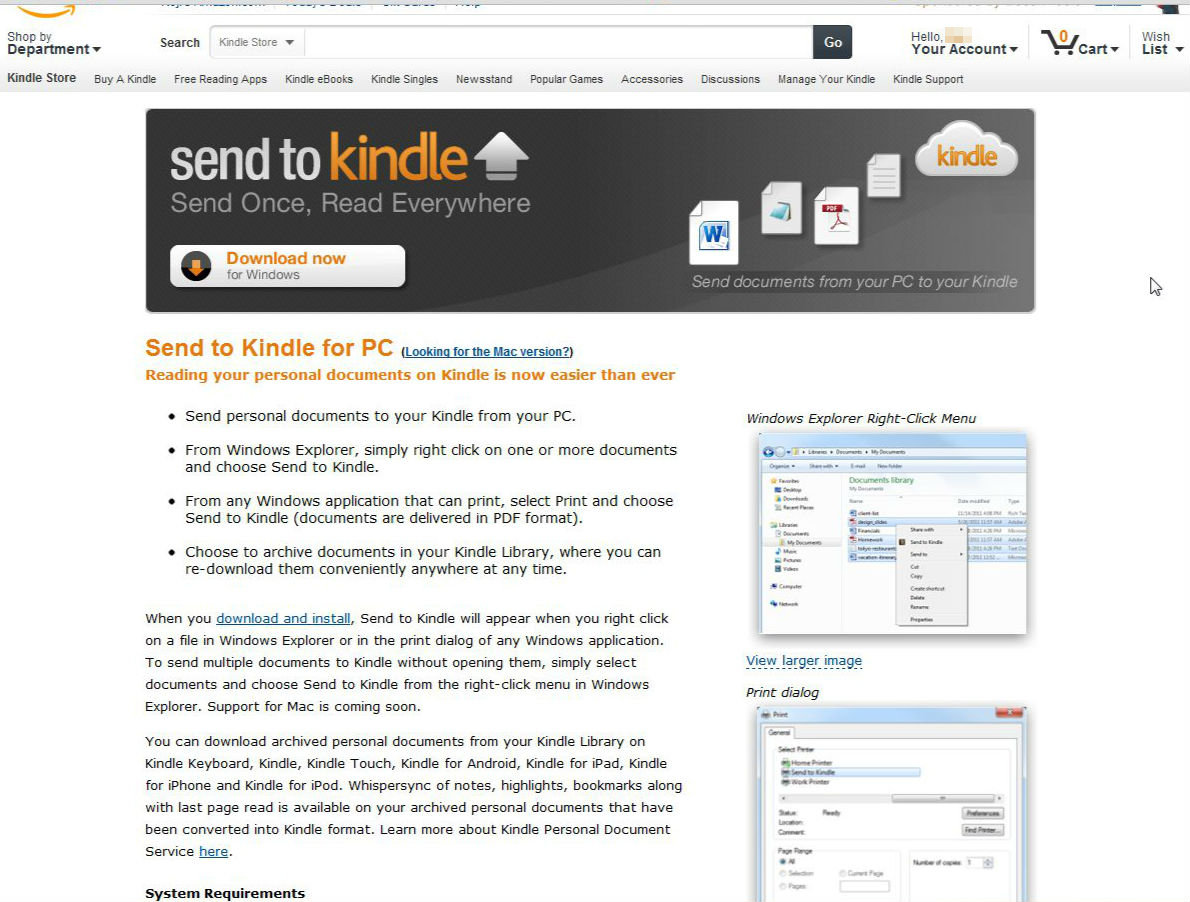
<h4>send to kindle for PC</h4>

<a href="//pdffreesoft.gjpw.net/File/7a93ef66.jpeg" target="_blank"><img alt="" src="//pdffreesoft.gjpw.net/Img/1339403704/" style="border-width: 0px; border-style: solid; width: 500px; height: 378px; " /></a>
<p>
	　</p>
<span style="font-size:x-small"><font style="color:#000080;">能書き　&darr;</font><br />
<font style="color:#000080;">キンドルは目に優しい電子ペーパーなので、なんでもできるだけKindleで読みたいと感じています。</font></span><font style="color:#000080;"><span style="font-size:x-small">&nbsp;</span></font><br />
<br />
<font style="color:#000080;"><span style="font-size:x-small">ちょっと前までは、クラウド上の自分のスペースには、基本的にAmazon.com（アメリカの）で購入したコンテンツだけしか置いておけない状態で、PC上のファイルをアマゾンのクラウド上にアップロードするには、キンドル付属のメールアドレス（アカウント名@Kindle.com）に添付して送らなければならず、不便でした。</span></font><font style="color:#000080;"><span style="font-size:x-small">&nbsp;</span></font><br />
<br />
<font style="color:#000080;"><span style="font-size:x-small">USBで自分でキンドル本体に入れた自作PDFやテキストなどはは自動ではクラウド上には反映されず、スマホや別のPC・別のキンドルでは即座に読めませんでした。クラウドリーダーがあっても、購入したコンテンツがないと読めないし、いちいちメールに添付して&hellip;というのもめんどくさい。</span></font><font style="color:#000080;"><span style="font-size:x-small">&nbsp;</span></font><br />
<br />
<font style="color:#000080;"><span style="font-size:x-small">そして、ひっそりとリリースされていたこんな便利なソフト（というかやっとか！）を発見しました。Windowsと、もちろんMac版もあり。</span></font><span style="font-size:x-small"><font style="color:#000080;">好きな人にはサードパーティで、<a href="http://www.instapaper.com/" target="_blank">Instapaper </a>や <a href="http://rekindle.it/" target="_blank">ReKindleIt</a>もありますが万人向けではない感じだし、これはやっと本家がリリースしたものです。</font></span>
<div>
	<br />
	<br />
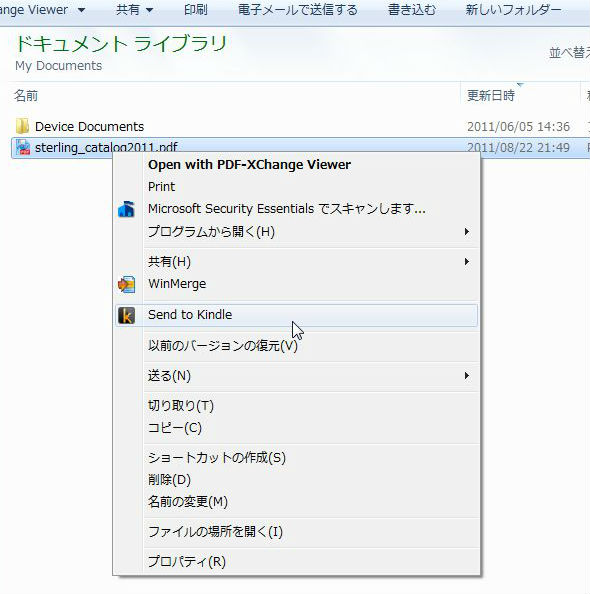
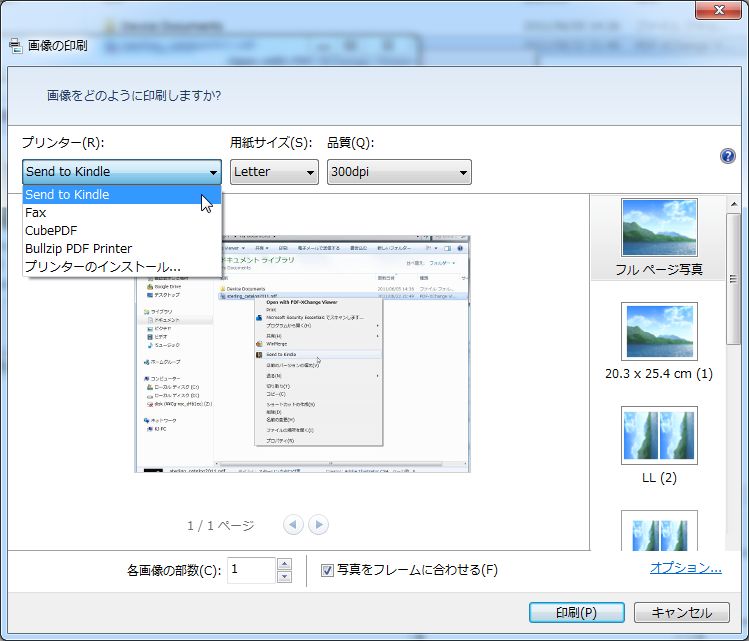
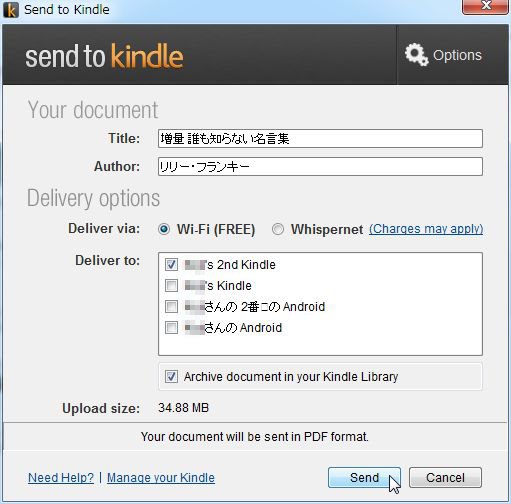
	<strong>send to kindle for PC&nbsp;</strong>は、パソコンにインストールしておくと対応ファイルなら<strong>右クリックで</strong>、<strong>非対応ファイルでも、CubePDFなどの</strong>PDFライターの要領で<strong>印刷ダイアログからPDF化</strong>されて<strong>自動アップロード</strong>できる、という便利でオススメな純正ソフトです。<br />
	&nbsp;</div>
<div>
	<div>
		<a href="//pdffreesoft.gjpw.net/File/5460e601.jpeg" target="_blank"><img alt="5460e601.jpeg" src="//pdffreesoft.gjpw.net/Img/1339405924/" style="border-width: 0px; border-style: solid; float: left; width: 297px; height: 300px; " /></a>　<a href="//pdffreesoft.gjpw.net/File/WS000006.JPG" target="_blank"><img alt="WS000006.JPG" src="//pdffreesoft.gjpw.net/Img/1339405941/" style="border-width: 0px; border-style: solid; vertical-align: text-bottom; width: 300px; height: 256px; " /></a><br />
		&nbsp;</div>
	<div>
		<a href="//pdffreesoft.gjpw.net/File/7fa5c5a9.jpeg" target="_blank"><img alt="7fa5c5a9.jpeg" src="//pdffreesoft.gjpw.net/Img/1339406696/" style="border-width: 0px; border-style: solid; vertical-align: text-bottom; width: 300px; height: 295px; " /></a><br />
		<br />
		このソフトのコンセプトは、PC上のファイルをインターネットとwifiを経由して自分のキンドルやスマホに送るという所だろうけど、<strong>一度クラウド上書庫にストック</strong>することを選択できるので、次に別のデバイスで読む時にもすぐにアクセスできますし、読み終えた<strong>最後のロケーションも同期</strong>できます。</div>
	<div>
		&nbsp;</div>
	<div>
		Kindle Library Amazon Cloud に対応するファイルタイプは</div>
	<div>
		&nbsp;</div>
	<div>
		Microsoft Word (.<strong>DOC</strong>、.DOCX)</div>
	<div>
		<strong>TXT</strong> (.TXT)</div>
	<div>
		<strong>RTF</strong> (.RTF)</div>
	<div>
		<strong>JPEG</strong> (.JPEG, .JPG)</div>
	<div>
		GIF (.GIF)</div>
	<div>
		PNG (.PNG)</div>
	<div>
		BMP (.BMP)</div>
	<div>
		<strong>PDF</strong> (.PDF)　のファイルです。</div>
	<div>
		&nbsp;</div>
	<div>
		ちなみに、自作の<strong>.mobiファイル</strong>をアップしたら（もちろん対応してます）、クラウド経由で手元のキンドルにきたファイルは<strong>.azwに自動変換</strong>されてサイズも小さくなっており、変換方法としても使えるのかもしれません。やっぱりアマゾン的には&rdquo;ファイル形式.mobi&rdquo;はオワコンなんですね。</div>
	<div>
		&nbsp;</div>
</div>
<strong>ダウンロード：</strong>　<a href="http://www.amazon.com/gp/feature.html/?docId=1000719931" target="_blank">Send to Kindle for PC</a>　【Amazon.com】<br />
<p><b>スポンサード リンク</b></p>
<script type="text/javascript"><!--
google_ad_client = "ca-pub-0147365728061329";
/* 336x280,新フッター　レクタングル10/06/22 */
google_ad_slot = "0983853595";
google_ad_width = 336;
google_ad_height = 280;
//-->
</script>
<script type="text/javascript"
src="http://pagead2.googlesyndication.com/pagead/show_ads.js">
</script>

<p></p>

<!-- AddThis Button BEGIN -->
<div class="addthis_toolbox addthis_default_style ">
<a class="addthis_button_facebook_like" fb:like:layout="button_count"></a>
<a class="addthis_button_tweet"></a>
<a class="addthis_button_google_plusone" g:plusone:size="medium"></a>
<a class="addthis_counter addthis_pill_style"></a>
</div>
<script type="text/javascript">var addthis_config = {"data_track_addressbar":true};</script>
<script type="text/javascript" src="http://s7.addthis.com/js/250/addthis_widget.js#pubid=ra-4fb4ee5b3bb7b9f0"></script>
<!-- AddThis Button END -->]]> 
    </content>
    <author>
            <name>sanmousaku</name>
        </author>
  </entry>
  <entry>
    <id>pdffreesoft.gjpw.net://entry/109</id>
    <link rel="alternate" type="text/html" href="http://pdffreesoft.gjpw.net/Entry/109/" />
    <published>2012-06-08T18:07:43+09:00</published> 
    <updated>2012-06-08T18:07:43+09:00</updated> 
    <category term="自炊カメラアプリ" label="自炊カメラアプリ" />
    <title>スマホのカメラを使って非破壊スキャンする　自炊アプリで本をPDF変換</title>
    <content mode="escaped" type="text/html" xml:lang="utf-8"> 
      <![CDATA[<p>
	<b>スポンサード リンク</b></p>
<script type="text/javascript"><!--
google_ad_client = "pub-0147365728061329";
/* 728x90, 作成済み 10/05/05 */
google_ad_slot = "0678247112";
google_ad_width = 728;
google_ad_height = 90;
//-->
</script><script type="text/javascript"
src="http://pagead2.googlesyndication.com/pagead/show_ads.js">
</script>
<p>
	　</p>
<script type="text/javascript" src="/ScriptLoader?type=YouTube&amp;id=-R7U03Y3dkw&amp;width=400&amp;height=300"></script>
<p>
	　</p>
<script type="text/javascript" src="/ScriptLoader?type=YouTube&amp;id=-FC_xRKI50U&amp;width=400&amp;height=300"></script>
<div>
	これらのアプリは、スマホで本をめくる動画を撮影しページごとに切り出した画像をPDF化するというもの。<br />
	<br />
	着眼点がナイスな、アイデア商品（アプリ）といった感じで、アイフォン、アンドロイド用何種類かあります。いずれも安いようです。<br />
	<br />
	とりあえず、&rdquo;とにかく読めればOK&rdquo;なレベルでいいなら、今はこういった方法もあるんですね。 最近のスマホに内蔵されたカメラも高機能になったため実現したんでしょうね。<br />
	&nbsp;</div>
<strong>利点</strong>
<ul>
	<li>
		スマホがさえあれば手軽にできる</li>
	<li>
		アプリの料金も無料～数百円程度</li>
	<li>
		本を切断しなくても良い</li>
</ul>
<strong>要改善点</strong>
<ul>
	<li>
		高品質には出来ない（どうにか読める程度）</li>
	<li>
		指が映り込む</li>
	<li>
		三脚などが必要</li>
	<li>
		撮影に若干の慣れ・忍耐・時間が必要</li>
</ul>
iPhone　：<a href="http://itunes.apple.com/app/jucie-zui-su-fei-po-huai-zi/id486667344?mt=8" target="_blank">JUCIE 最速非破壊自炊カメラ</a>　【App Store　＄1.99】<br />
Android　：<a href="https://play.google.com/store/apps/details?id=com.bfrontier.JisuiCameraFreedom&amp;hl=ja" target="_blank">自炊カメラ FlipScanner</a>　【Google Play　￥160】<br />
<br />
<strong>参考リンク</strong><br />
<br />
<a href="http://3152.co/jucie/" target="_blank">最速自炊カメラ・ジューシイ</a>　【JUCIE　HP】<br />
<a href="http://gigazine.net/news/20111219-non-destructive-scan-iphone-app-jucie/" target="_blank"> 非破壊自炊を手軽かつ最速で行えるカメラアプリ「JUCIE」リリース</a>　【GIGAZINE】<br />
<br />
<a href="http://www.tabroid.jp/app/tools/2012/02/com.bfrontier.JisuiCameraFreedom.html" target="_blank">スキャナ要らず!? 毎分20ページ超え、断裁不要の『自炊カメラ』を試してみたんだが&hellip;</a>　【TABROID】<br />
<a href="http://www.youtube.com/watch?v=-FC_xRKI50U" target="_blank">自炊カメラアプリ FlipScanner で本を自炊（電子化）する方法です ..</a>　【YouTube】
<p><b>スポンサード リンク</b></p>
<script type="text/javascript"><!--
google_ad_client = "ca-pub-0147365728061329";
/* 336x280,新フッター　レクタングル10/06/22 */
google_ad_slot = "0983853595";
google_ad_width = 336;
google_ad_height = 280;
//-->
</script>
<script type="text/javascript"
src="http://pagead2.googlesyndication.com/pagead/show_ads.js">
</script>

<p></p>

<!-- AddThis Button BEGIN -->
<div class="addthis_toolbox addthis_default_style ">
<a class="addthis_button_facebook_like" fb:like:layout="button_count"></a>
<a class="addthis_button_tweet"></a>
<a class="addthis_button_google_plusone" g:plusone:size="medium"></a>
<a class="addthis_counter addthis_pill_style"></a>
</div>
<script type="text/javascript">var addthis_config = {"data_track_addressbar":true};</script>
<script type="text/javascript" src="http://s7.addthis.com/js/250/addthis_widget.js#pubid=ra-4fb4ee5b3bb7b9f0"></script>
<!-- AddThis Button END -->
]]> 
    </content>
    <author>
            <name>sanmousaku</name>
        </author>
  </entry>
  <entry>
    <id>pdffreesoft.gjpw.net://entry/108</id>
    <link rel="alternate" type="text/html" href="http://pdffreesoft.gjpw.net/Entry/108/" />
    <published>2012-06-01T15:42:27+09:00</published> 
    <updated>2012-06-01T15:42:27+09:00</updated> 
    <category term="有料ソフト" label="有料ソフト" />
    <title>JUST PDF 2 [作成・高度編集・データ変換] </title>
    <content mode="escaped" type="text/html" xml:lang="utf-8"> 
      <![CDATA[<p>
	<b>スポンサード リンク</b></p>
<script type="text/javascript"><!--
google_ad_client = "pub-0147365728061329";
/* 728x90, 作成済み 10/05/05 */
google_ad_slot = "0678247112";
google_ad_width = 728;
google_ad_height = 90;
//-->
</script><script type="text/javascript"
src="http://pagead2.googlesyndication.com/pagead/show_ads.js">
</script>
<h3>
	アクロバット（スタンダード）の他社製下位互換・廉価版ソフト。</h3>
<div>
	定価でそれの半額以下となっており、コストパフォマンスがとても高いです。</div>
<div>
	&nbsp;</div>
<div>
	<a href="http://www.amazon.co.jp/gp/product/B005902CQ6/ref=as_li_ss_tl?ie=UTF8&amp;tag=hogasu-22&amp;linkCode=as2&amp;camp=247&amp;creative=7399&amp;creativeASIN=B005902CQ6">JUST PDF 2 [作成・高度編集・データ変換]</a><img alt="" border="0" height="1" src="http://www.assoc-amazon.jp/e/ir?t=hogasu-22&amp;l=as2&amp;o=9&amp;a=B005902CQ6" style="border:none !important; margin:0px !important;" width="1" /> は、3本のソフトのセットとなっていて別々にも販売されています。用途に応じて個別に『作成』、『高度編集』、『データ変換』を使い分けます。</div>
<ul>
	<li>
		<a href="http://www.amazon.co.jp/gp/product/B0059026LC/ref=as_li_ss_tl?ie=UTF8&amp;tag=hogasu-22&amp;linkCode=as2&amp;camp=247&amp;creative=7399&amp;creativeASIN=B0059026LC">JUST PDF 2 [作成] </a><img alt="" border="0" height="1" src="http://www.assoc-amazon.jp/e/ir?t=hogasu-22&amp;l=as2&amp;o=9&amp;a=B0059026LC" style="border:none !important; margin:0px !important;" width="1" /> でPDF化、</li>
	<li>
		『JUST PDF 2 [高度編集]』ではPDFの編集、</li>
	<li>
		<a href="http://www.amazon.co.jp/gp/product/B0059028E2/ref=as_li_ss_tl?ie=UTF8&amp;tag=hogasu-22&amp;linkCode=as2&amp;camp=247&amp;creative=7399&amp;creativeASIN=B0059028E2">JUST PDF 2 [データ変換] </a><img alt="" border="0" height="1" src="http://www.assoc-amazon.jp/e/ir?t=hogasu-22&amp;l=as2&amp;o=9&amp;a=B0059028E2" style="border:none !important; margin:0px !important;" width="1" /> は、Excel・Word・一太郎形式に逆変換、またはJpeg等に変換します。</li>
</ul>
<div>
	値段の割りには機能面は充実していて、一般用途には十分だと思います。<br />
	&nbsp;</div>
<div>
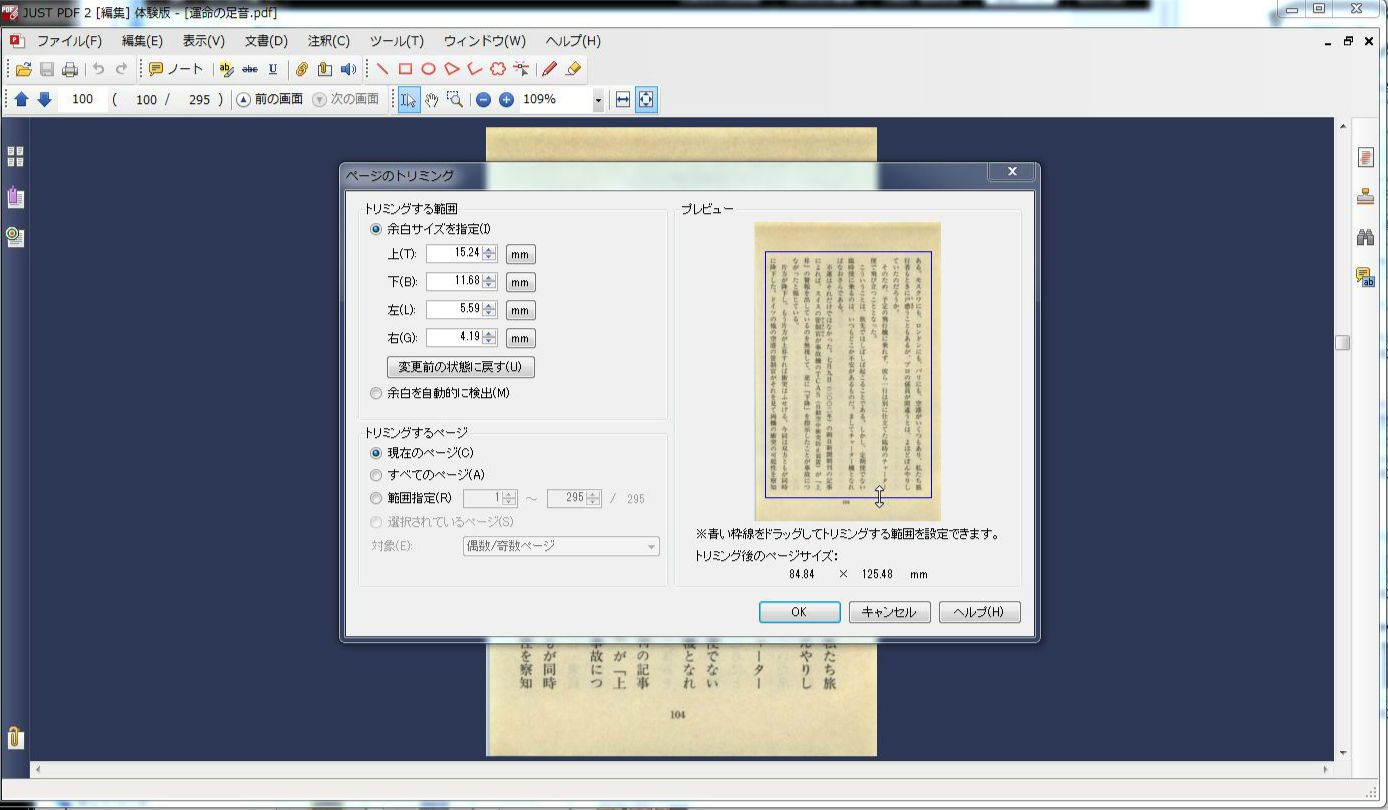
	個人的にはページのトリミング機能が有難いです（JUST PDF 2 [編集]）。<br />
	&nbsp;</div>
<div>
	<a href="//pdffreesoft.gjpw.net/File/5a515b37.jpeg" target="_blank"><img alt="JustPDF2でページのトリミング" src="//pdffreesoft.gjpw.net/Img/1338534229/" style="border-width: 0px; border-style: solid; vertical-align: text-bottom; width: 300px; height: 175px; " /></a></div>
<div>
	&nbsp;</div>
<div>
	<br />
	<br />
	<font style="color:#ff0000;">更に [高度編集]の機能をしぼったバージョンのセットの<a href="http://www.amazon.co.jp/gp/product/B005902AIQ/ref=as_li_ss_tl?ie=UTF8&amp;tag=hogasu-22&amp;linkCode=as2&amp;camp=247&amp;creative=7399&amp;creativeASIN=B005902AIQ">JUST PDF 2 [作成・編集・データ変換] ダウンロード版</a><img alt="" border="0" height="1" src="http://www.assoc-amazon.jp/e/ir?t=hogasu-22&amp;l=as2&amp;o=9&amp;a=B005902AIQ" style="border:none !important; margin:0px !important;" width="1" /> は、3368円（ダウンロード版）からとなっています。</font></div>
<div>
	&nbsp;</div>
<div>
	<strong>ジャストシステムの<a href="http://www.justsystems.com/jp/products/justpdf/price.html" target="_blank">製品ページ</a>にて、10日間使える試用版も提供されています。</strong></div>
<div>
	&nbsp;</div>
<div>
	&nbsp;</div>
<div>
	アクロバット（スタンダード）との機能比較は<a href="http://www.justsystems.com/jp/products/justpdf/lineup.html#consumer" target="_blank">こちら</a>（Just Systems HP）</div>
<div>
	&nbsp;</div>
<div>
	<table border="1" cellpadding="1" cellspacing="1" style="width: 500px; ">
		<tbody>
			<tr>
				<td>
					<iframe frameborder="0" marginheight="0" marginwidth="0" scrolling="no" src="http://rcm-jp.amazon.co.jp/e/cm?lt1=_blank&amp;bc1=FFFFFF&amp;IS2=1&amp;bg1=FFFFFF&amp;fc1=000000&amp;lc1=0000FF&amp;t=hogasu-22&amp;o=9&amp;p=8&amp;l=as4&amp;m=amazon&amp;f=ifr&amp;ref=ss_til&amp;asins=B004FG65DG" style="width:120px;height:240px;"></iframe></td>
				<td>
					<iframe frameborder="0" marginheight="0" marginwidth="0" scrolling="no" src="http://rcm-jp.amazon.co.jp/e/cm?lt1=_blank&amp;bc1=A7F1C5&amp;IS2=1&amp;nou=1&amp;bg1=A7F1C5&amp;fc1=000000&amp;lc1=0000FF&amp;t=hogasu-22&amp;o=9&amp;p=8&amp;l=as4&amp;m=amazon&amp;f=ifr&amp;ref=ss_til&amp;asins=B005902CQ6" style="width:120px;height:240px;"></iframe></td>
				<td>
					<iframe frameborder="0" marginheight="0" marginwidth="0" scrolling="no" src="http://rcm-jp.amazon.co.jp/e/cm?lt1=_blank&amp;bc1=FFFFFF&amp;IS2=1&amp;bg1=FFFFFF&amp;fc1=000000&amp;lc1=0000FF&amp;t=hogasu-22&amp;o=9&amp;p=8&amp;l=as4&amp;m=amazon&amp;f=ifr&amp;ref=ss_til&amp;asins=B004FG65KE" style="width:120px;height:240px;"></iframe></td>
				<td>
					<iframe frameborder="0" marginheight="0" marginwidth="0" scrolling="no" src="http://rcm-jp.amazon.co.jp/e/cm?lt1=_blank&amp;bc1=A7F1C5&amp;IS2=1&amp;nou=1&amp;bg1=A7F1C5&amp;fc1=000000&amp;lc1=0000FF&amp;t=hogasu-22&amp;o=9&amp;p=8&amp;l=as4&amp;m=amazon&amp;f=ifr&amp;ref=ss_til&amp;asins=B005902AIQ" style="width:120px;height:240px;"></iframe></td>
			</tr>
		</tbody>
	</table>
</div>
<p>
	<b>スポンサード リンク</b></p>
<script type="text/javascript"><!--
google_ad_client = "ca-pub-0147365728061329";
/* 336x280,新フッター　レクタングル10/06/22 */
google_ad_slot = "0983853595";
google_ad_width = 336;
google_ad_height = 280;
//-->
</script><script type="text/javascript"
src="http://pagead2.googlesyndication.com/pagead/show_ads.js">
</script>
<p>
	&nbsp;</p>
<!-- AddThis Button BEGIN -->
<div class="addthis_toolbox addthis_default_style ">
<a class="addthis_button_facebook_like" fb:like:layout="button_count"></a>
<a class="addthis_button_tweet"></a>
<a class="addthis_button_google_plusone" g:plusone:size="medium"></a>
<a class="addthis_counter addthis_pill_style"></a>
</div>
<script type="text/javascript">var addthis_config = {"data_track_addressbar":true};</script>
<script type="text/javascript" src="http://s7.addthis.com/js/250/addthis_widget.js#pubid=ra-4fb4ee5b3bb7b9f0"></script>
<!-- AddThis Button END -->
]]> 
    </content>
    <author>
            <name>sanmousaku</name>
        </author>
  </entry>
  <entry>
    <id>pdffreesoft.gjpw.net://entry/107</id>
    <link rel="alternate" type="text/html" href="http://pdffreesoft.gjpw.net/Entry/107/" />
    <published>2012-05-29T19:21:35+09:00</published> 
    <updated>2012-05-29T19:21:35+09:00</updated> 
    <category term="Kindle3" label="Kindle3" />
    <title>Amazon Kindle （キンドル 3） にPDFファイルを入れて読む</title>
    <content mode="escaped" type="text/html" xml:lang="utf-8"> 
      <![CDATA[<p>
	<b>スポンサード リンク</b></p>
<script type="text/javascript"><!--
google_ad_client = "pub-0147365728061329";
/* 728x90, 作成済み 10/05/05 */
google_ad_slot = "0678247112";
google_ad_width = 728;
google_ad_height = 90;
//-->
</script><script type="text/javascript"
src="http://pagead2.googlesyndication.com/pagead/show_ads.js">
</script>
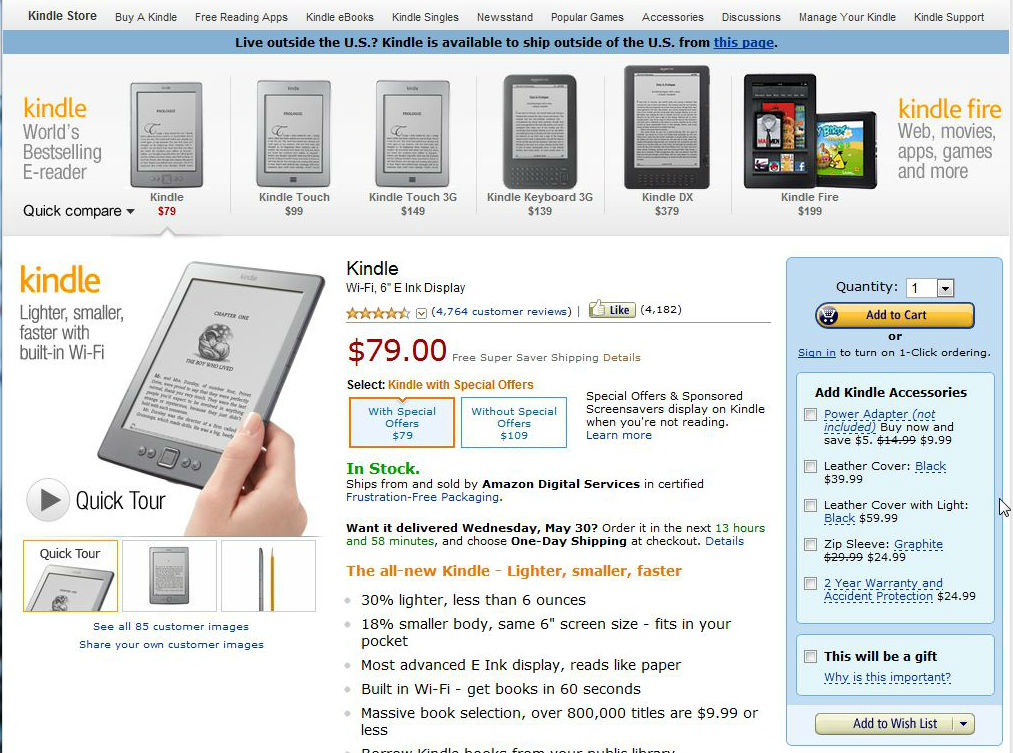
<p>アメリカのamazon.comで売っているKindleです。<br /></p>
<a href="//pdffreesoft.gjpw.net/File/WS000065_copy.jpg" target="_blank"><img alt="" border="0" src="//pdffreesoft.gjpw.net/Img/1338285558/" /></a><br />
<br />
2012年5月現在、Kindleは第4世代目で、＄79（広告スクリーンセーバー入り）～と大変安くなりました。 私のKindle３も『Kindle　Keyboard』と名前を変えて継続中です。<br />
<br />
Kindle 3 は、PDFファイルにも対応しているので入れてみます。<br />
<a href="//pdffreesoft.gjpw.net/File/WS000062.JPG" target="_blank"><img alt="WS000062.JPG" src="//pdffreesoft.gjpw.net/Img/1338285560/" style="border-width: 0px; border-style: solid; vertical-align: text-bottom; width: 300px; height: 210px; " /></a><br />
<br />
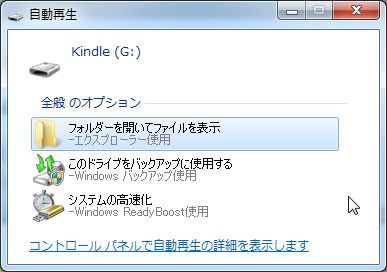
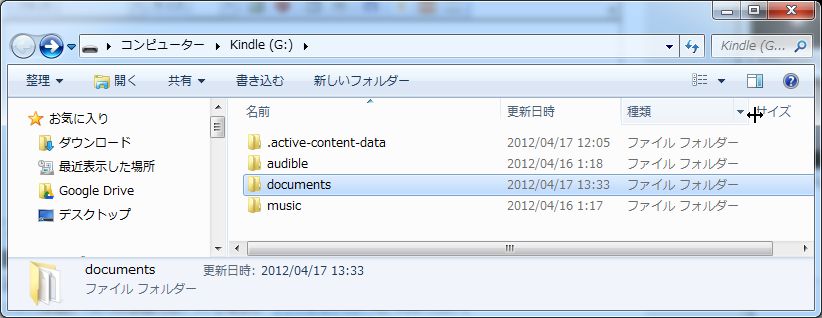
普通にUSBでPCにつなぐとドライブとして認識されるので、documentsフォルダにドラッグ・ドロップします。 更に子フォルダを作成してジャンル別などに整理してもOK。<br />
<a href="//pdffreesoft.gjpw.net/File/WS000063.JPG" target="_blank"><img alt="WS000063.JPG" src="//pdffreesoft.gjpw.net/Img/1338285559/" style="border-width: 0px; border-style: solid; vertical-align: text-bottom; width: 300px; height: 116px; " /></a><br />
<br />
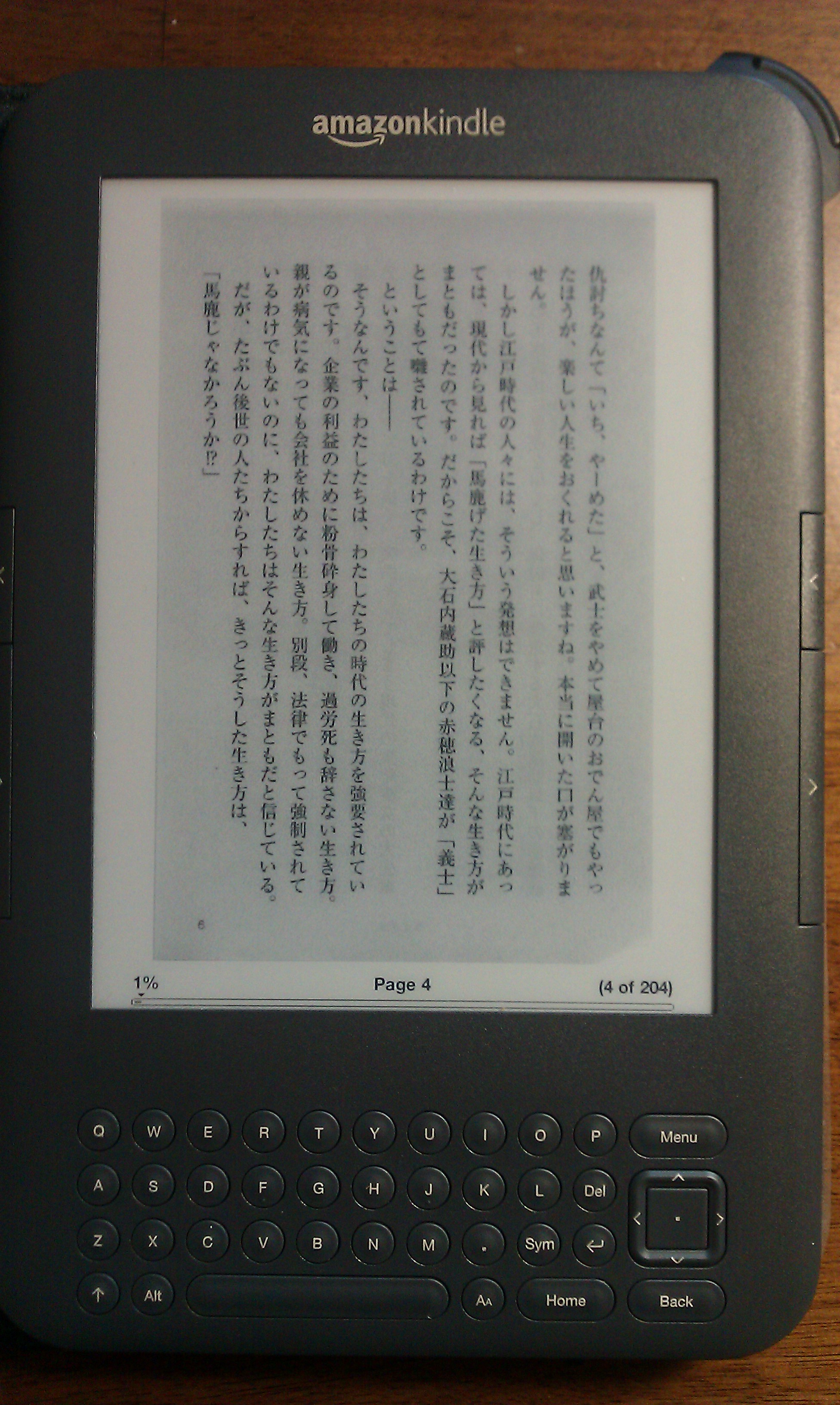
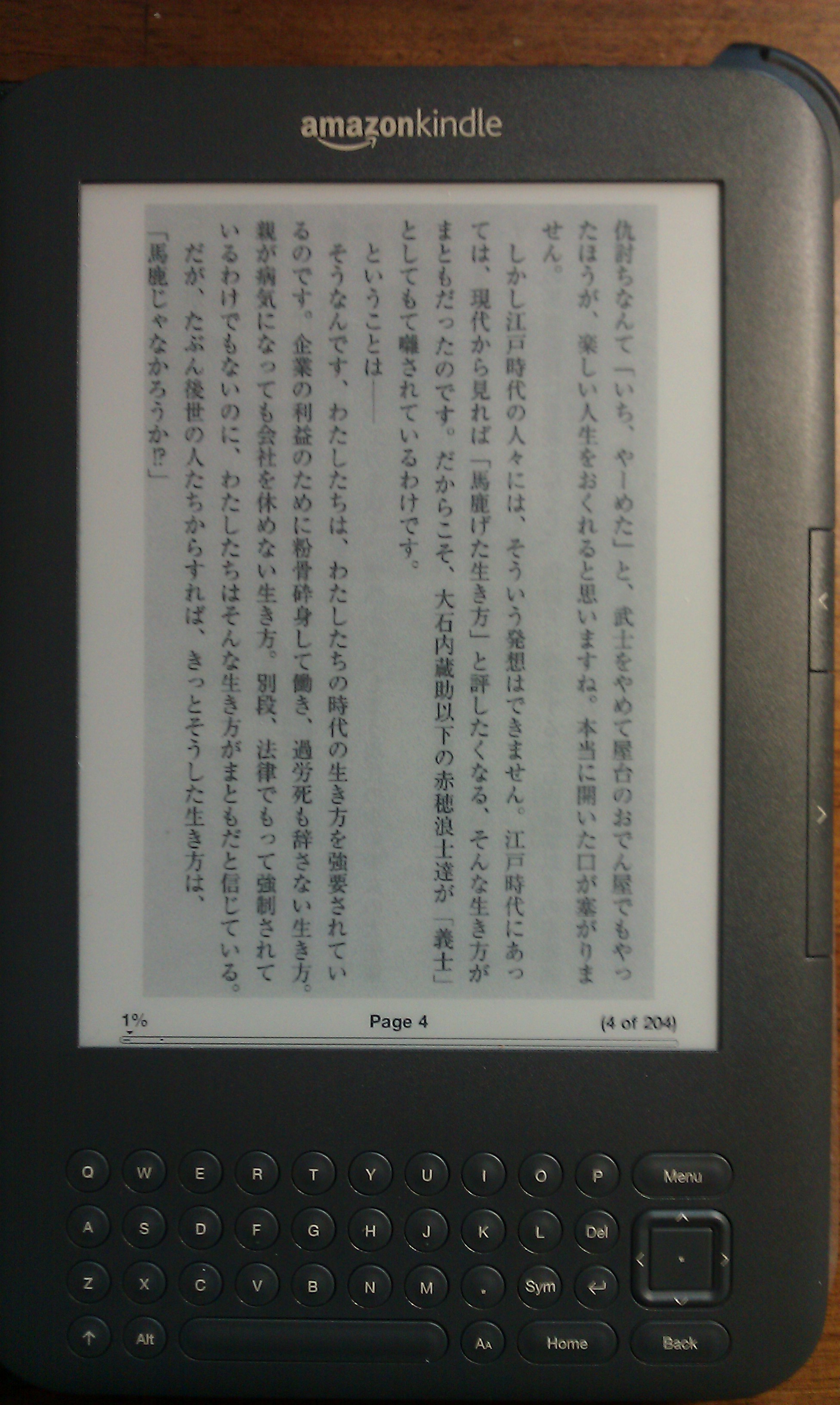
文庫本を連続スキャンしたPDFですが、このような感じに表示されました。<br />
<a href="//pdffreesoft.gjpw.net/File/IMAG0237.jpg" target="_blank"><img alt="IMAG0237.jpg" src="//pdffreesoft.gjpw.net/Img/1338285911/" style="border-width: 0px; border-style: solid; vertical-align: text-bottom; width: 179px; height: 300px; " /></a><br />
Kindleディスプレイの余白とスキャンした本自体の余白があるので、文字エリアは狭まり文字が小さくなります。大判の本はもっと小さくなります。<br />
<br />
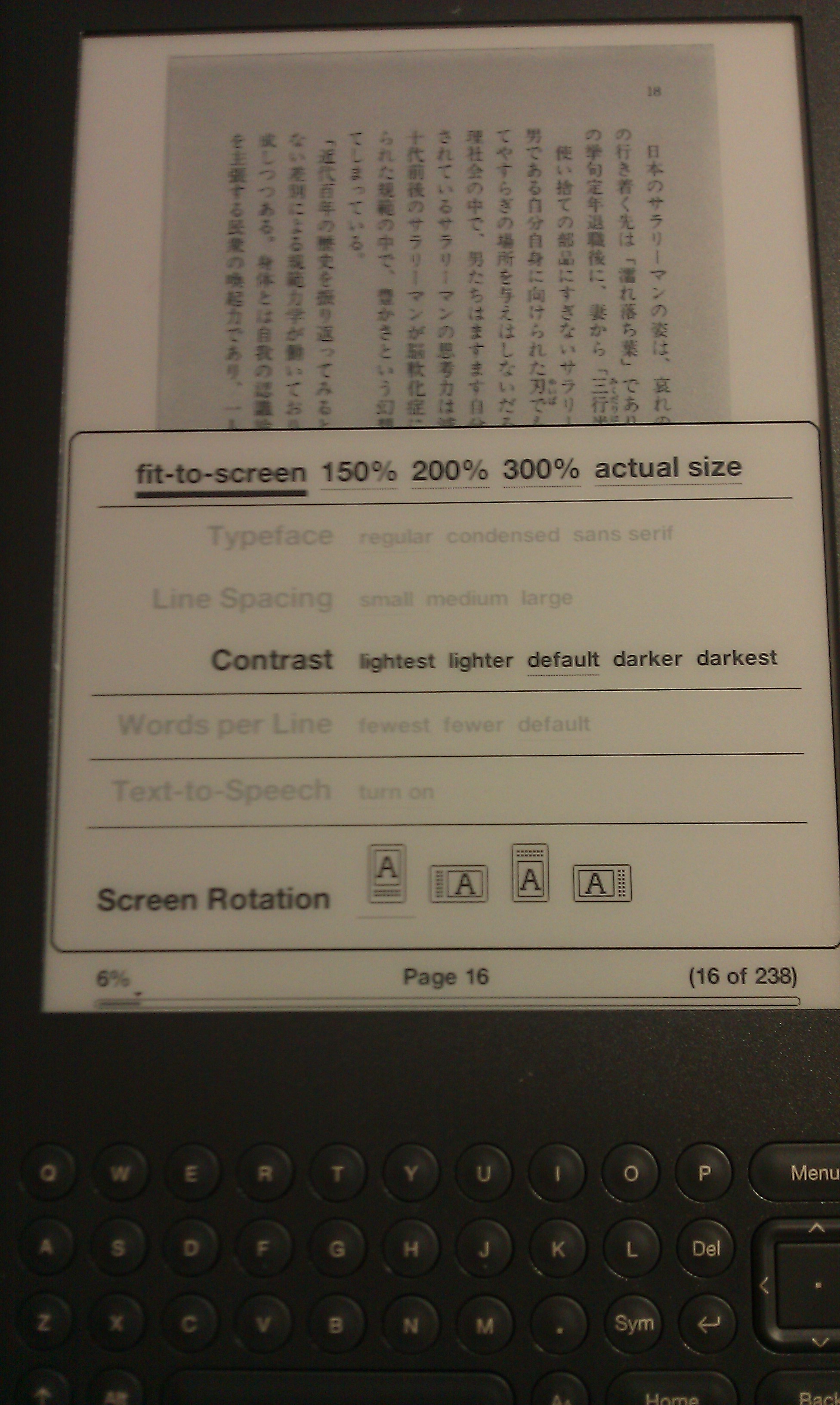
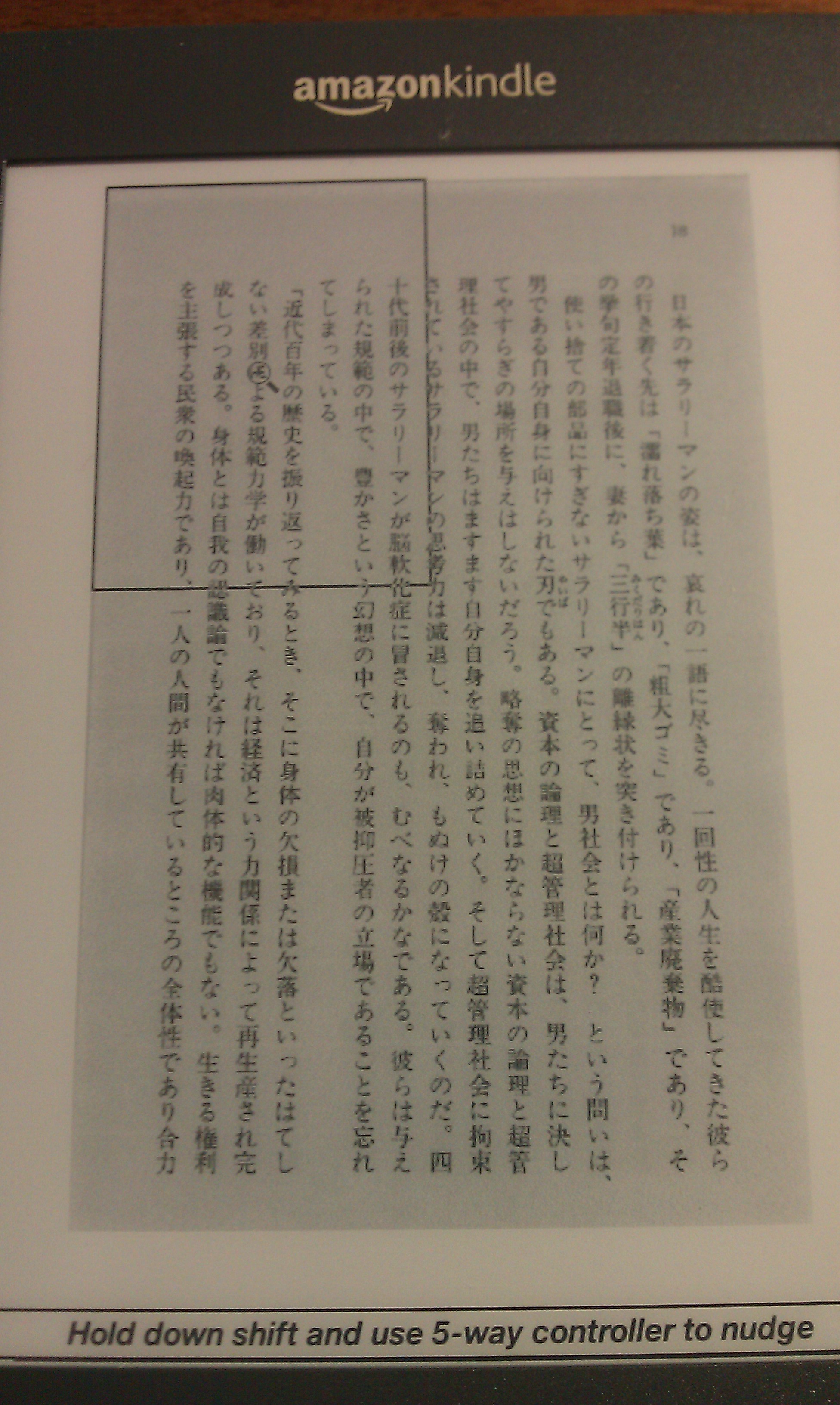
拡大表示ももちろんできますが、読み進めるには手間取り、ストレスになります。（大きなPDFはiPadやパソコンで読んだほうがいいでしょう）<br />
<a href="//pdffreesoft.gjpw.net/File/IMAG0042.jpg" target="_blank"><img alt="IMAG0042.jpg" src="//pdffreesoft.gjpw.net/Img/1338286023/" style="border-width: 0px; border-style: solid; vertical-align: text-bottom; width: 179px; height: 300px; " /></a><br />
<br />
<a href="//pdffreesoft.gjpw.net/File/IMAG0044.jpg" target="_blank"><img alt="IMAG0044.jpg" src="//pdffreesoft.gjpw.net/Img/1338286024/" style="border-width: 0px; border-style: solid; vertical-align: text-bottom; width: 179px; height: 300px; " /></a><br />
<br />
<a href="//pdffreesoft.gjpw.net/File/IMAG0045.jpg" target="_blank"><img alt="IMAG0045.jpg" src="//pdffreesoft.gjpw.net/Img/1338286021/" style="border-width: 0px; border-style: solid; vertical-align: text-bottom; width: 179px; height: 300px; " /></a><br />
<br />
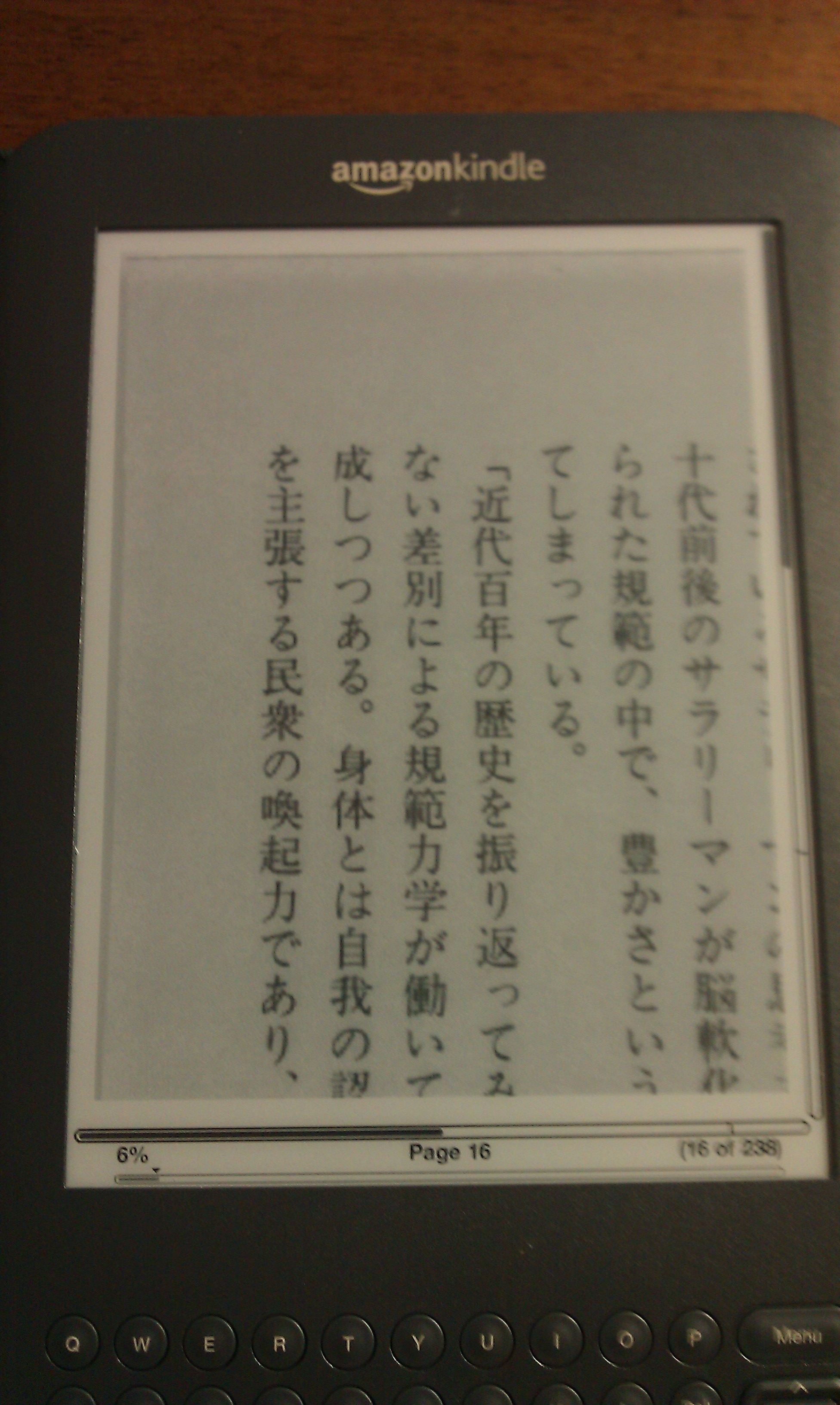
そこで、<a href="http://pdffreesoft.gjpw.net/Entry/82/">PDF Scissors</a>というフリーソフトで、PDFの余白を削りとってみたものがこちら。当然、元のページ番号やヘッダ・フッタは切り捨てとなります。<br />
<br />
<a href="//pdffreesoft.gjpw.net/File/IMAG0234.jpg" target="_blank"><img alt="IMAG0234.jpg" src="//pdffreesoft.gjpw.net/Img/1338285910/" style="border-width: 0px; border-style: solid; vertical-align: text-bottom; width: 179px; height: 300px; " /></a><br />
<br />
それでも、融通のきかないPDFの文字を少しでも大きく、スッキリ快適に読み進めたいという人にはおすすめの方法です。
<p>
	<a href="http://pdffreesoft.gjpw.net/Entry/82/">PDF Scissorsについての詳細記事</a></p>
<p>
	<b>スポンサード リンク</b></p>
<script type="text/javascript"><!--
google_ad_client = "ca-pub-0147365728061329";
/* 336x280,新フッター　レクタングル10/06/22 */
google_ad_slot = "0983853595";
google_ad_width = 336;
google_ad_height = 280;
//-->
</script><script type="text/javascript"
src="http://pagead2.googlesyndication.com/pagead/show_ads.js">
</script>
<p>
	&nbsp;</p>
<!-- AddThis Button BEGIN -->
<div class="addthis_toolbox addthis_default_style ">
<a class="addthis_button_facebook_like" fb:like:layout="button_count"></a>
<a class="addthis_button_tweet"></a>
<a class="addthis_button_google_plusone" g:plusone:size="medium"></a>
<a class="addthis_counter addthis_pill_style"></a>
</div>
<script type="text/javascript">var addthis_config = {"data_track_addressbar":true};</script>
<script type="text/javascript" src="http://s7.addthis.com/js/250/addthis_widget.js#pubid=ra-4fb4ee5b3bb7b9f0"></script>
<!-- AddThis Button END -->
]]> 
    </content>
    <author>
            <name>sanmousaku</name>
        </author>
  </entry>
  <entry>
    <id>pdffreesoft.gjpw.net://entry/106</id>
    <link rel="alternate" type="text/html" href="http://pdffreesoft.gjpw.net/Entry/106/" />
    <published>2012-05-25T19:01:39+09:00</published> 
    <updated>2012-05-25T19:01:39+09:00</updated> 
    <category term="シェアウエア" label="シェアウエア" />
    <title>pdfStamp その他の画像</title>
    <content mode="escaped" type="text/html" xml:lang="utf-8"> 
      <![CDATA[<p>
	<b>スポンサード リンク</b></p>
<script type="text/javascript"><!--
google_ad_client = "pub-0147365728061329";
/* 728x90, 作成済み 10/05/05 */
google_ad_slot = "0678247112";
google_ad_width = 728;
google_ad_height = 90;
//-->
</script><script type="text/javascript"
src="http://pagead2.googlesyndication.com/pagead/show_ads.js">
</script>
<p>
	　</p>
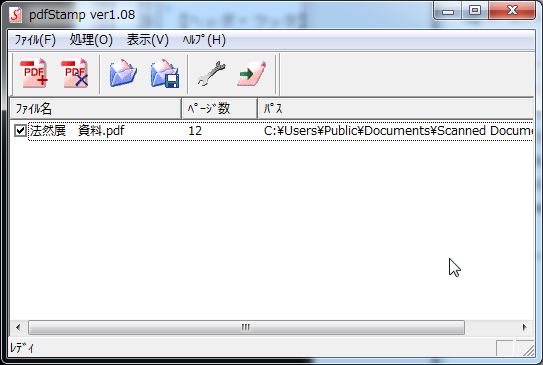
<strong>PdfStamp　メイン画面</strong><br />
<br />
<a href="//pdffreesoft.gjpw.net/File/WS000024.JPG" target="_blank"><img alt="WS000024.JPG" src="//pdffreesoft.gjpw.net/Img/1337939080/" style="border-width: 0px; border-style: solid; vertical-align: text-bottom; width: 300px; height: 201px; " /></a><br />
<br />
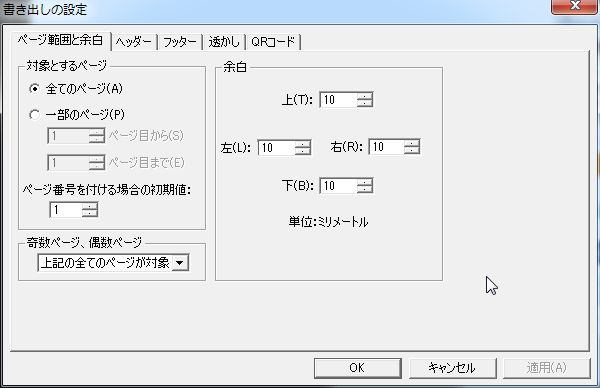
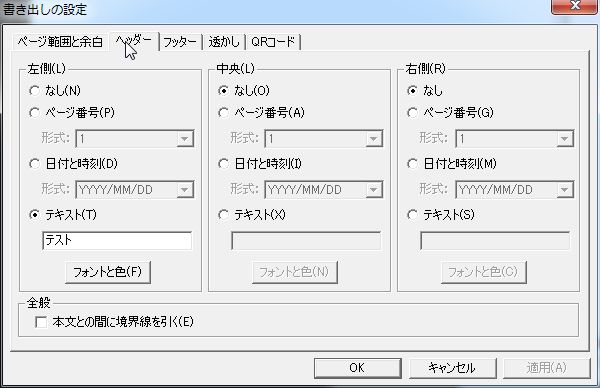
<strong>設定ダイアログボックスの画像</strong><br />
<br />
<a href="//pdffreesoft.gjpw.net/File/WS000020.JPG" target="_blank"><img alt="WS000020.JPG" src="//pdffreesoft.gjpw.net/Img/1337939658/" style="border-width: 0px; border-style: solid; vertical-align: text-bottom; width: 300px; height: 194px; " /></a><br />
<br />
<a href="//pdffreesoft.gjpw.net/File/WS000021.JPG" target="_blank"><img alt="WS000021.JPG" src="//pdffreesoft.gjpw.net/Img/1337939657/" style="border-width: 0px; border-style: solid; vertical-align: text-bottom; width: 300px; height: 194px; " /></a><br />
<br />
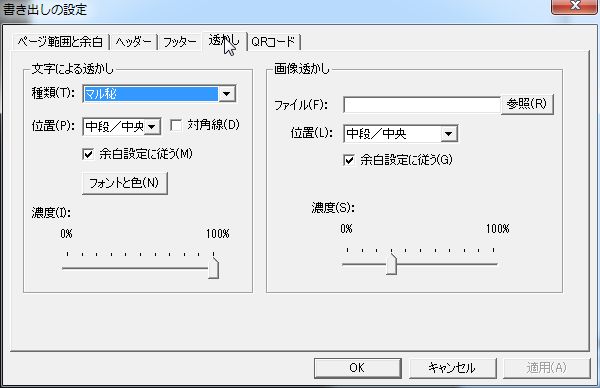
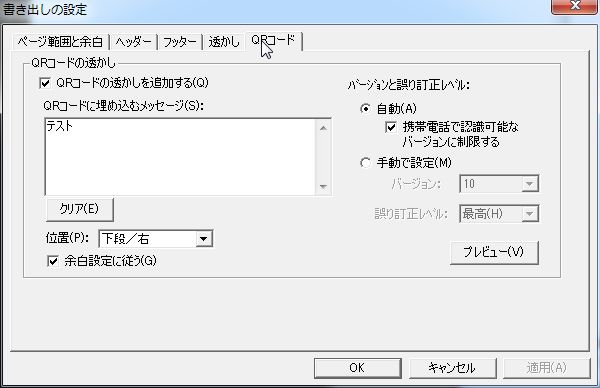
<a href="//pdffreesoft.gjpw.net/File/WS000022.JPG" target="_blank"><img alt="WS000022.JPG" src="//pdffreesoft.gjpw.net/Img/1337939659/" style="border-width: 0px; border-style: solid; vertical-align: text-bottom; width: 300px; height: 194px; " /></a><br />
<br />
<a href="//pdffreesoft.gjpw.net/File/WS000023.JPG" target="_blank"><img alt="WS000023.JPG" src="//pdffreesoft.gjpw.net/Img/1337939660/" style="border-width: 0px; border-style: solid; vertical-align: text-bottom; width: 300px; height: 194px; " /></a><br />
<br />
<a href="http://pdffreesoft.gjpw.net/Entry/76/">pdfStamp へ戻る</a>
<p>
	<b>スポンサード リンク</b></p>
<script type="text/javascript"><!--
google_ad_client = "ca-pub-0147365728061329";
/* 336x280,新フッター　レクタングル10/06/22 */
google_ad_slot = "0983853595";
google_ad_width = 336;
google_ad_height = 280;
//-->
</script><script type="text/javascript"
src="http://pagead2.googlesyndication.com/pagead/show_ads.js">
</script>
<p>
	&nbsp;</p>
<!-- AddThis Button BEGIN -->
<div class="addthis_toolbox addthis_default_style ">
<a class="addthis_button_facebook_like" fb:like:layout="button_count"></a>
<a class="addthis_button_tweet"></a>
<a class="addthis_button_google_plusone" g:plusone:size="medium"></a>
<a class="addthis_counter addthis_pill_style"></a>
</div>
<script type="text/javascript">var addthis_config = {"data_track_addressbar":true};</script>
<script type="text/javascript" src="http://s7.addthis.com/js/250/addthis_widget.js#pubid=ra-4fb4ee5b3bb7b9f0"></script>
<!-- AddThis Button END -->
]]> 
    </content>
    <author>
            <name>sanmousaku</name>
        </author>
  </entry>
  <entry>
    <id>pdffreesoft.gjpw.net://entry/105</id>
    <link rel="alternate" type="text/html" href="http://pdffreesoft.gjpw.net/Entry/105/" />
    <published>2012-05-23T16:16:49+09:00</published> 
    <updated>2012-05-23T16:16:49+09:00</updated> 
    <category term="自炊代行業者" label="自炊代行業者" />
    <title>自炊代行業者　その後</title>
    <content mode="escaped" type="text/html" xml:lang="utf-8"> 
      <![CDATA[<p><b>スポンサード リンク</b></p>
<script type="text/javascript"><!--
google_ad_client = "pub-0147365728061329";
/* 728x90, 作成済み 10/05/05 */
google_ad_slot = "0678247112";
google_ad_width = 728;
google_ad_height = 90;
//-->
</script>
<script type="text/javascript"
src="http://pagead2.googlesyndication.com/pagead/show_ads.js">
</script>

<p>　</p>

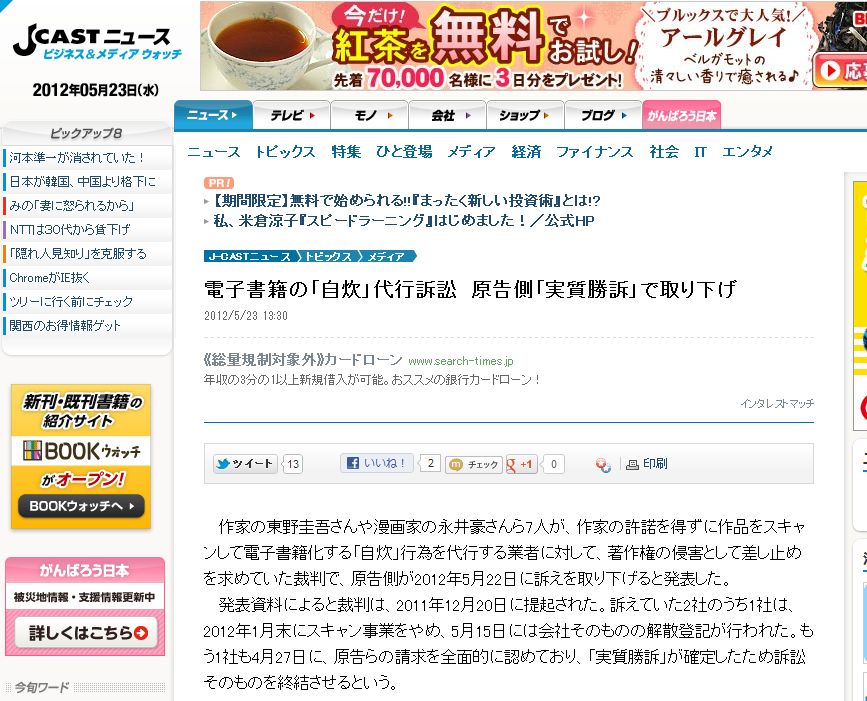
<a href="http://www.j-cast.com/2012/05/23133033.html" target="_blank">電子書籍の「自炊」代行訴訟　原告側「実質勝訴」で取り下げ</a> <span style="font-size:x-small">J Cast Newsより</span><br />
<a href="//pdffreesoft.gjpw.net/File/WS000016.JPG" target="_blank"><img alt="" src="//pdffreesoft.gjpw.net/Img/1337757366/" style="border-width: 0px; border-style: solid; vertical-align: text-bottom; " /></a><br />
<br />
作家の東野圭吾さんや漫画家の永井豪さんら7人が、作家の許諾を得ずに作品をスキャンして電子書籍化する「自炊」行為を代行する業者に対して、著作権の侵害として差し止めを求めていた裁判で、原告側が2012年5月22日に訴えを取り下げると発表した。<br />
<br />
発表資料によると裁判は、2011年12月20日に提起された。訴えていた2社のうち1社は、2012年1月末にスキャン事業をやめ、5月15日には会社そのものの解散登記が行われた。もう1社も4月27日に、原告らの請求を全面的に認めており、「実質勝訴」が確定したため訴訟そのものを終結させるという。 

<p><b>スポンサード リンク</b></p>
<script type="text/javascript"><!--
google_ad_client = "ca-pub-0147365728061329";
/* 336x280,新フッター　レクタングル10/06/22 */
google_ad_slot = "0983853595";
google_ad_width = 336;
google_ad_height = 280;
//-->
</script>
<script type="text/javascript"
src="http://pagead2.googlesyndication.com/pagead/show_ads.js">
</script>

<p></p>

<!-- AddThis Button BEGIN -->
<div class="addthis_toolbox addthis_default_style ">
<a class="addthis_button_facebook_like" fb:like:layout="button_count"></a>
<a class="addthis_button_tweet"></a>
<a class="addthis_button_google_plusone" g:plusone:size="medium"></a>
<a class="addthis_counter addthis_pill_style"></a>
</div>
<script type="text/javascript">var addthis_config = {"data_track_addressbar":true};</script>
<script type="text/javascript" src="http://s7.addthis.com/js/250/addthis_widget.js#pubid=ra-4fb4ee5b3bb7b9f0"></script>
<!-- AddThis Button END -->
]]> 
    </content>
    <author>
            <name>sanmousaku</name>
        </author>
  </entry>
  <entry>
    <id>pdffreesoft.gjpw.net://entry/104</id>
    <link rel="alternate" type="text/html" href="http://pdffreesoft.gjpw.net/Entry/104/" />
    <published>2012-05-23T12:20:54+09:00</published> 
    <updated>2012-05-23T12:20:54+09:00</updated> 
    <category term="フリーソフト" label="フリーソフト" />
    <title>PDF Xchange Viewer　PROとの違い</title>
    <content mode="escaped" type="text/html" xml:lang="utf-8"> 
      <![CDATA[<p>
	<b>スポンサード リンク</b></p>
<script type="text/javascript"><!--
google_ad_client = "pub-0147365728061329";
/* 728x90, 作成済み 10/05/05 */
google_ad_slot = "0678247112";
google_ad_width = 728;
google_ad_height = 90;
//-->
</script><script type="text/javascript"
src="http://pagead2.googlesyndication.com/pagead/show_ads.js">
</script>
<p>
	　</p>
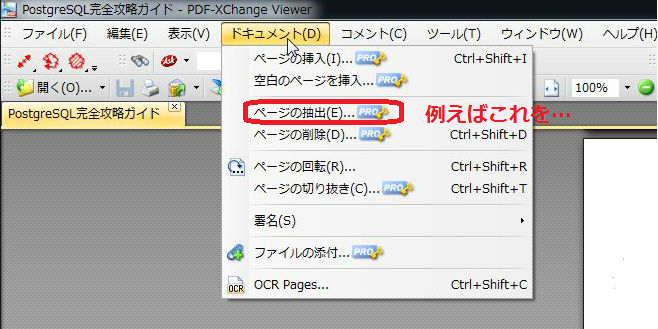
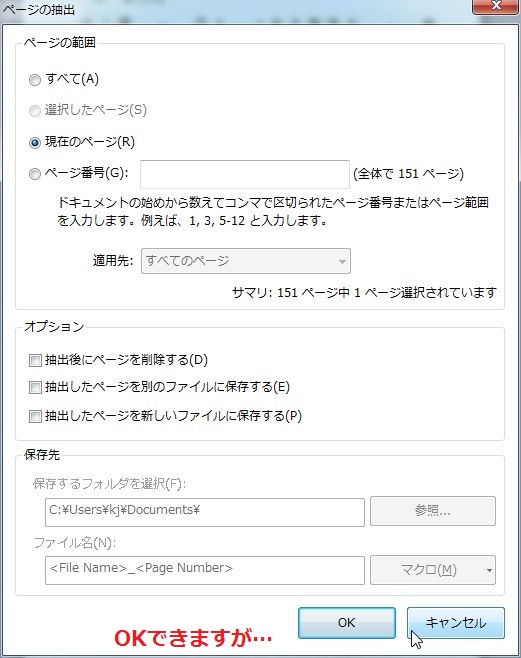
例えば、フリー版で制限された機能であるページの抽出を選択してみます。<br />
<a href="//pdffreesoft.gjpw.net/File/056ce337.png" target="_blank"><img alt="056ce337.png" src="//pdffreesoft.gjpw.net/Img/1337742591/" style="border-width: 0px; border-style: solid; vertical-align: text-bottom; width: 300px; height: 150px; " /></a><br />
<br />
すると、<br />
<br />
<a href="//pdffreesoft.gjpw.net/File/WS000000.JPG" target="_blank"><img alt="WS000000.JPG" src="//pdffreesoft.gjpw.net/Img/1337742592/" style="border-width: 0px; border-style: solid; vertical-align: text-bottom; width: 237px; height: 300px; " /></a><br />
<br />
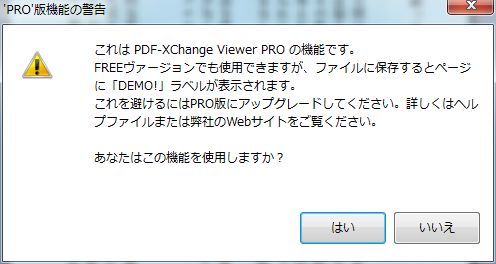
フリー版でもできるんだーと思いきや、<br />
<br />
<a href="//pdffreesoft.gjpw.net/File/WS000001.JPG" target="_blank"><img alt="WS000001.JPG" src="//pdffreesoft.gjpw.net/Img/1337742593/" style="border-width: 0px; border-style: solid; vertical-align: text-bottom; width: 300px; height: 159px; " /></a><br />
<br />
注意されますが、できそうですね～。<br />
<br />
<a href="//pdffreesoft.gjpw.net/File/49e70c70.jpeg" target="_blank"><img alt="49e70c70.jpeg" src="//pdffreesoft.gjpw.net/Img/1337742594/" style="border-width: 0px; border-style: solid; vertical-align: text-bottom; width: 300px; height: 217px; " /></a><br />
<br />
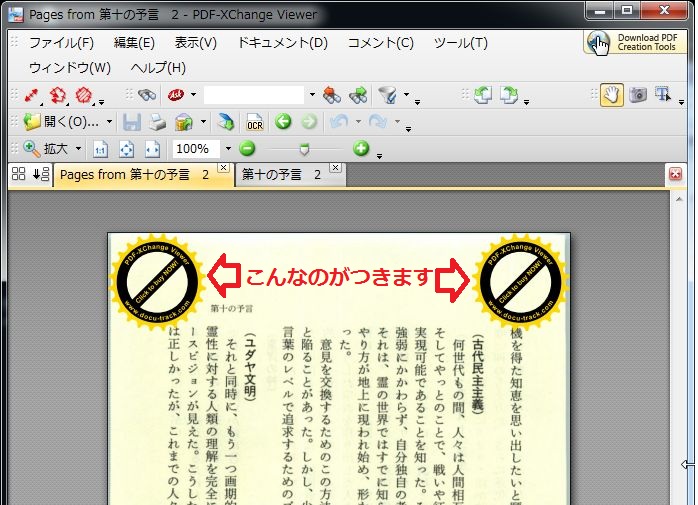
できました！。　でっかいマークが付きました&hellip;。<br />
<br />
これを防ぐには、＄37.5（一年）～ですよ。<br />
<br />
<strong style="margin: 0px; padding: 0px; font-size: 14px; color: rgb(0, 0, 0); font-family: メイリオ, Meiryo, 'ヒラギノ角ゴ Pro W3', 'Hiragino Kaku Gothic pro', Osaka, 'ＭＳ Ｐゴシック', 'MS P Gothic', sans-serif; line-height: 22px; ">ダウンロード：</strong><span style="color: rgb(0, 0, 0); font-family: メイリオ, Meiryo, 'ヒラギノ角ゴ Pro W3', 'Hiragino Kaku Gothic pro', Osaka, 'ＭＳ Ｐゴシック', 'MS P Gothic', sans-serif; font-size: 14px; line-height: 22px; ">　</span><a href="http://www.tracker-software.com/product/pdf-xchange-viewer" style="margin: 0px; padding: 0px; font-size: 14px; color: rgb(51, 102, 204); font-family: メイリオ, Meiryo, 'ヒラギノ角ゴ Pro W3', 'Hiragino Kaku Gothic pro', Osaka, 'ＭＳ Ｐゴシック', 'MS P Gothic', sans-serif; line-height: 22px; " target="_blank">PDF Xchange Viewer</a>　（無料版）<br />
アップグレードするには：　<a href="http://www.tracker-software.com/buy-now" target="_blank">http://www.tracker-software.com/buy-now</a><br />
<p>
	<b>スポンサード リンク</b></p>
<script type="text/javascript"><!--
google_ad_client = "ca-pub-0147365728061329";
/* 336x280,新フッター　レクタングル10/06/22 */
google_ad_slot = "0983853595";
google_ad_width = 336;
google_ad_height = 280;
//-->
</script><script type="text/javascript"
src="http://pagead2.googlesyndication.com/pagead/show_ads.js">
</script>
<p>
	&nbsp;</p>
<!-- AddThis Button BEGIN -->
<div class="addthis_toolbox addthis_default_style ">
<a class="addthis_button_facebook_like" fb:like:layout="button_count"></a>
<a class="addthis_button_tweet"></a>
<a class="addthis_button_google_plusone" g:plusone:size="medium"></a>
<a class="addthis_counter addthis_pill_style"></a>
</div>
<script type="text/javascript">var addthis_config = {"data_track_addressbar":true};</script>
<script type="text/javascript" src="http://s7.addthis.com/js/250/addthis_widget.js#pubid=ra-4fb4ee5b3bb7b9f0"></script>
<!-- AddThis Button END -->
]]> 
    </content>
    <author>
            <name>sanmousaku</name>
        </author>
  </entry>
  <entry>
    <id>pdffreesoft.gjpw.net://entry/39</id>
    <link rel="alternate" type="text/html" href="http://pdffreesoft.gjpw.net/Entry/39/" />
    <published>2012-05-23T08:29:51+09:00</published> 
    <updated>2012-05-23T08:29:51+09:00</updated> 
    <category term="リーダー・ビューア" label="リーダー・ビューア" />
    <title>PDF Xchange　Viewer</title>
    <content mode="escaped" type="text/html" xml:lang="utf-8"> 
      <![CDATA[<p>
	<b>スポンサード リンク</b></p>
<script type="text/javascript"><!--
google_ad_client = "pub-0147365728061329";
/* 728x90, 作成済み 10/05/05 */
google_ad_slot = "0678247112";
google_ad_width = 728;
google_ad_height = 90;
//-->
</script><script type="text/javascript"
src="http://pagead2.googlesyndication.com/pagead/show_ads.js">
</script>
<p>
	　</p>
<h3>
	フリーソフトでも強力な編集機能を備えたビューア</h3>
<p>
	<a href="//pdffreesoft.gjpw.net/File/773bb36a.PNG" target="_blank"><img alt="" border="0" src="//pdffreesoft.gjpw.net/Img/1272439135/" /></a><br />
	<a href="//pdffreesoft.gjpw.net/File/WS000004.JPG" target="_blank"><img alt="" border="0" src="//pdffreesoft.gjpw.net/Img/1337735354/" /></a><br />
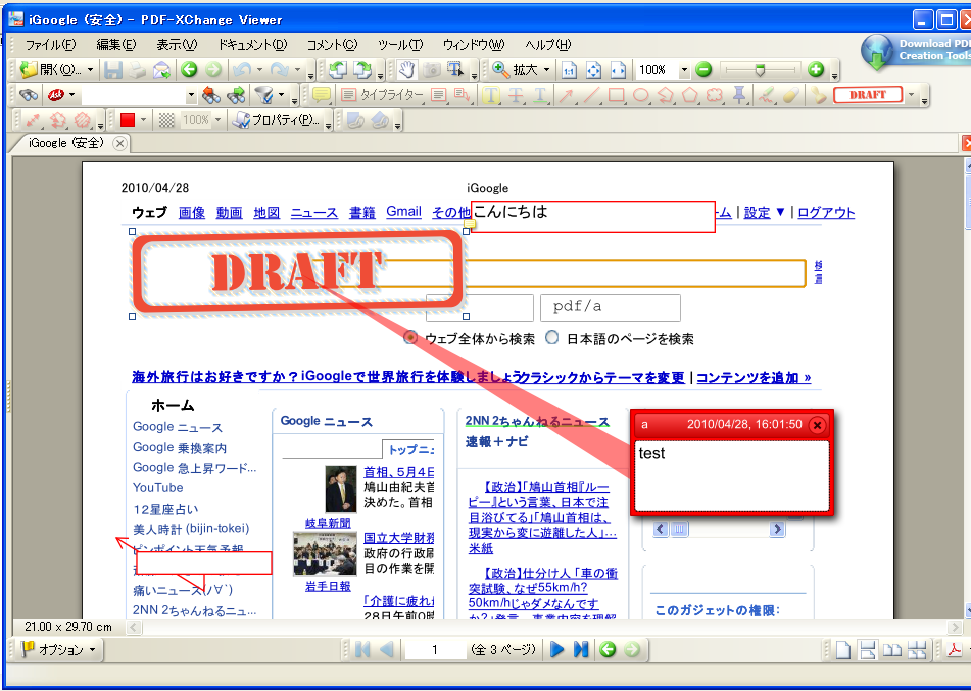
	このソフトも<a href="http://pdffreesoft.gjpw.net/Entry/84/" target="_blank">Foxit J-Reader</a>と同様、ビューアーとはいいながらも、ミニ・アクロバットととでも言いたいぐらい編集機能が豊富です。</p>
<p>
	テキスト書き込み・注釈・図形挿入・付箋紙貼付け・文字の装飾・フォントの変更など、ほぼあらゆる編集が可能。セキュリティも最新のアクロバット９（暗号化256bit AES）レベルを適用可能です。</p>
<p>
	このソフトでの上位版である<a href="http://pdffreesoft.gjpw.net/Entry/104/" target="_blank">PDF Xchange ViewerPROとの違い</a>はページの追加・削除位であり、そこは他のフリーソフトでカバーできる点だろうし、これはお得な一本です。</p>
<p>
	なお、新規作成するドキュメントには、&rdquo;DEMO!&rdquo;のウォータマークが入ります。（<a href="http://pdffreesoft.gjpw.net/Entry/104/" target="_blank">PDF Xchange Viewer　PROとの違い</a>）これを防ぐには有料版（＄37.5～）をということです。</p>
<p>
	もちろん、ビューアとしてもタブブライズ機能で複数のPDFを快適に閲覧可能です。<br />
	&nbsp;</p>
<p>
	&nbsp;<b style="color: rgb(255, 0, 0); "><span style="background-color:#ffff00;">OCR機能が追加されました！</span></b></p>
<p>
	フリーソフトでOCR機能付とは画期的ですね。日本語の認識率は&hellip;です(:_;)。英語ではいいのかもしれません。<br />
	私がテストしてみた様子はコチラ&darr;</p>
<p>
	<a href="http://pdffreesoft.gjpw.net/Entry/103/" target="_blank">OCR 精度の比較　無料版と有料（製品）版</a><br />
	&nbsp;</p>
<font style="color:#2f4f4f;"><span style="font-size:x-small">64Bit 版のウィンドウズにも対応しています。</span></font><br />
<div>
	<br />
	<strong>ダウンロード：</strong>　<a href="http://www.tracker-software.com/product/pdf-xchange-viewer" target="_blank">PDF Xchange Viewer</a></div>
<p>
	<b>スポンサード リンク</b></p>
<script type="text/javascript"><!--
google_ad_client = "ca-pub-0147365728061329";
/* 336x280,新フッター　レクタングル10/06/22 */
google_ad_slot = "0983853595";
google_ad_width = 336;
google_ad_height = 280;
//-->
</script><script type="text/javascript"
src="http://pagead2.googlesyndication.com/pagead/show_ads.js">
</script>
<p>
	&nbsp;</p>
<!-- AddThis Button BEGIN -->
<div class="addthis_toolbox addthis_default_style ">
<a class="addthis_button_facebook_like" fb:like:layout="button_count"></a>
<a class="addthis_button_tweet"></a>
<a class="addthis_button_google_plusone" g:plusone:size="medium"></a>
<a class="addthis_counter addthis_pill_style"></a>
</div>
<script type="text/javascript">var addthis_config = {"data_track_addressbar":true};</script>
<script type="text/javascript" src="http://s7.addthis.com/js/250/addthis_widget.js#pubid=ra-4fb4ee5b3bb7b9f0"></script>
<!-- AddThis Button END -->
]]> 
    </content>
    <author>
            <name>sanmousaku</name>
        </author>
  </entry>
  <entry>
    <id>pdffreesoft.gjpw.net://entry/103</id>
    <link rel="alternate" type="text/html" href="http://pdffreesoft.gjpw.net/Entry/103/" />
    <published>2012-05-21T15:55:38+09:00</published> 
    <updated>2012-05-21T15:55:38+09:00</updated> 
    <category term="OCR" label="OCR" />
    <title>OCR 精度の比較　無料版と有料（製品）版</title>
    <content mode="escaped" type="text/html" xml:lang="utf-8"> 
      <![CDATA[<p>
	<b>スポンサード リンク</b></p>
<script type="text/javascript"><!--
google_ad_client = "pub-0147365728061329";
/* 728x90, 作成済み 10/05/05 */
google_ad_slot = "0678247112";
google_ad_width = 728;
google_ad_height = 90;
//-->
</script><script type="text/javascript"
src="http://pagead2.googlesyndication.com/pagead/show_ads.js">
</script>
<p>
	　</p>
<font style="font-size:medium;">フリーソフトの<a href="http://pdffreesoft.gjpw.net/Entry/39/" target="_blank">PDF XChange Viewer（無料版）</a>のOCR機能と、有料製品の<a href="http://www.amazon.co.jp/gp/product/B000MTON1G/ref=as_li_ss_tl?ie=UTF8&amp;tag=hogasu-22&amp;linkCode=as2&amp;camp=247&amp;creative=7399&amp;creativeASIN=B000MTON1G">読んde!!ココ Ver.13</a><img alt="" border="0" height="1" src="http://www.assoc-amazon.jp/e/ir?t=hogasu-22&amp;l=as2&amp;o=9&amp;a=B000MTON1G" style="border:none !important; margin:0px !important;" width="1" />（エプソン）のOCR機能を比較してみました。</font><br />
<br />
<a href="http://www.amazon.co.jp/gp/product/B005UXGP8S/ref=as_li_ss_tl?ie=UTF8&tag=hogasu-22&linkCode=as2&camp=247&creative=7399&creativeASIN=B005UXGP8S">FUJITSU ScanSnap S1500</a><img src="http://www.assoc-amazon.jp/e/ir?t=hogasu-22&l=as2&o=9&a=B005UXGP8S" width="1" height="1" border="0" alt="" style="border:none !important; margin:0px !important;" />
のデフォルト設定でPDF化した少し古い本（元サイズB5版位）の１ページです。<br />
<br />
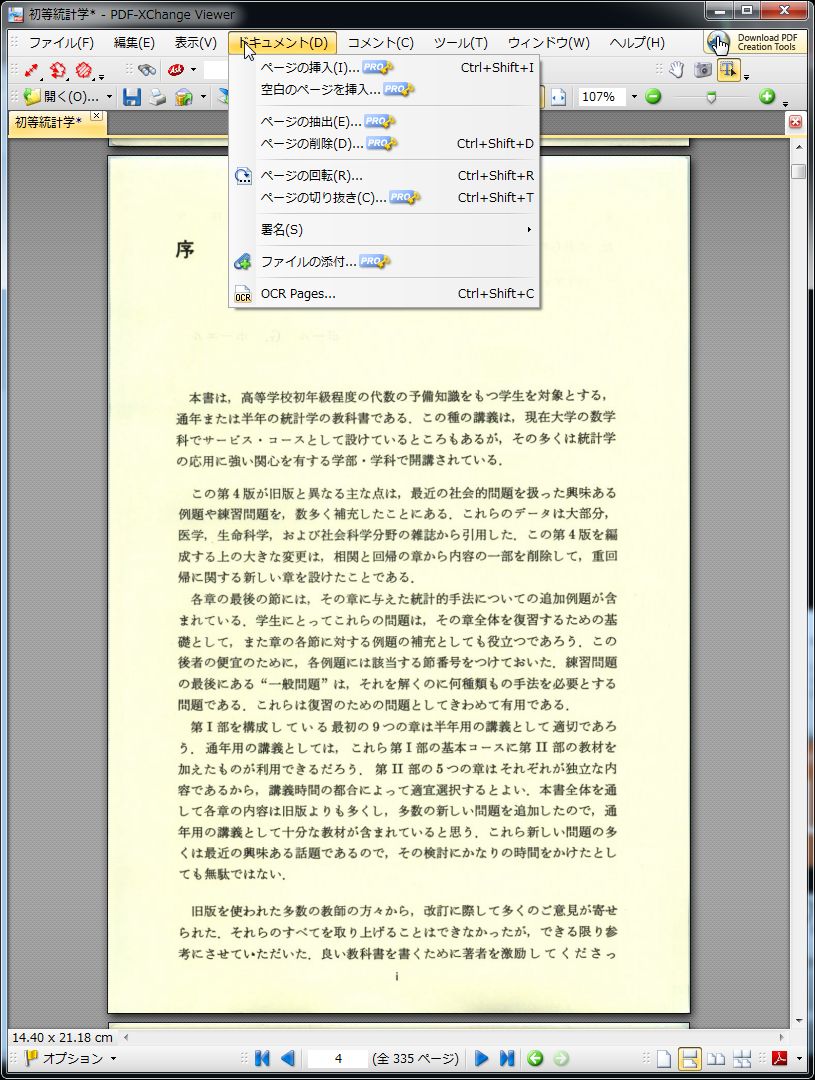
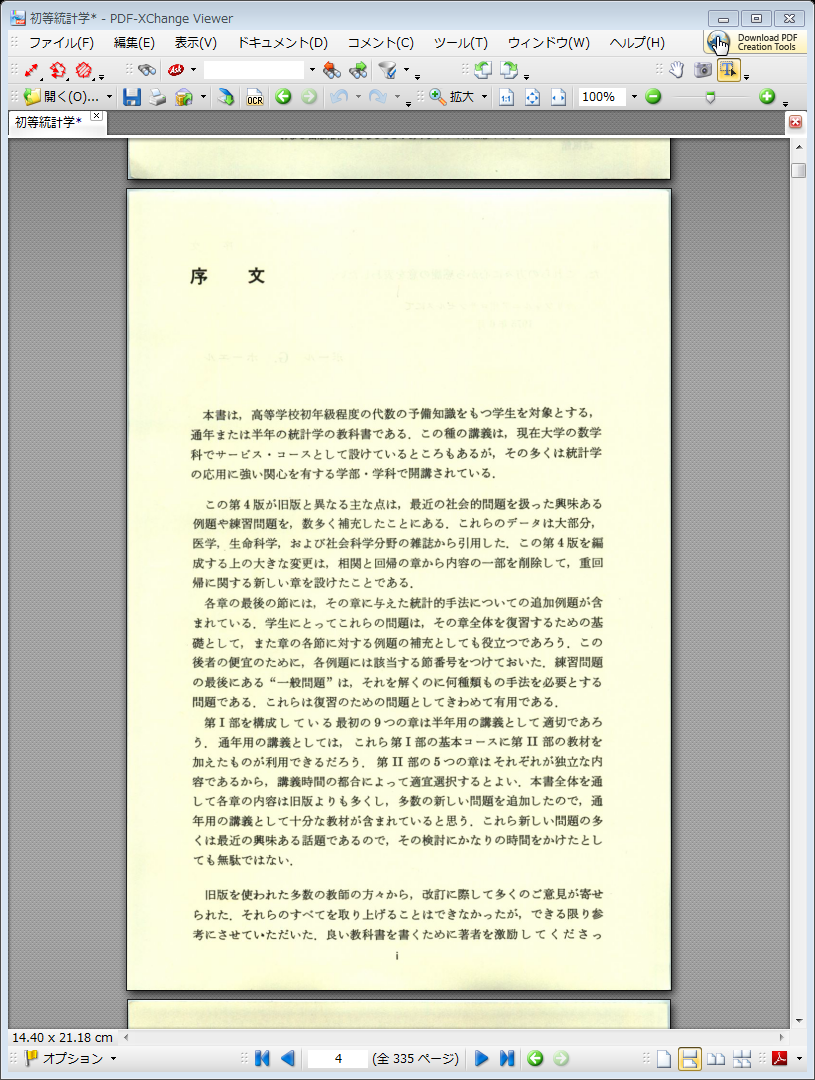
<a href="//pdffreesoft.gjpw.net/File/0003179C.png" target="_blank"><img alt="" src="//pdffreesoft.gjpw.net/Img/1337580500/" style="border-width: 0px; border-style: solid; vertical-align: text-bottom; " /></a><br />
<br />
<br />
<br />
<h4>
	まずは、<strong>PDF Xchange Viewer（無料版）</strong>のOCR機能を使ってテキスト情報を抽出します。</h4>
<br />
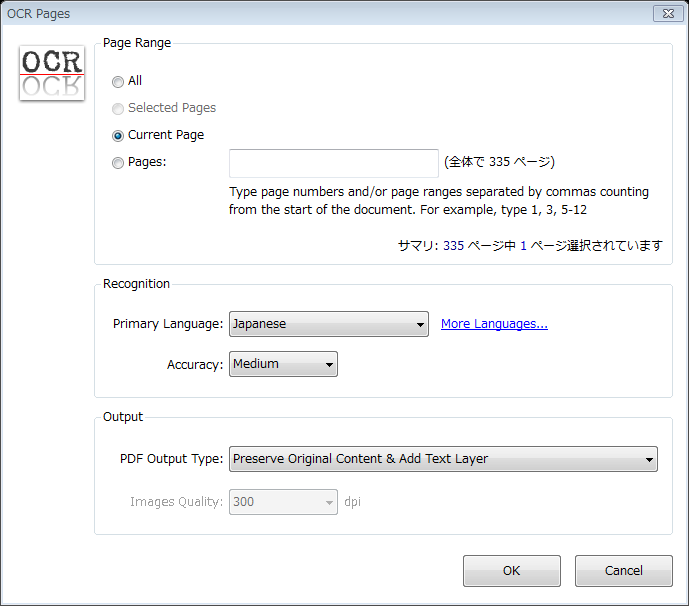
やり方は、ツールバーのOCRボタンを押して出てきたダイアログボックスでページ指定と、Primary Language をJapaneseに変更してOKを。<br />
<a href="//pdffreesoft.gjpw.net/File/004D1B92.png" target="_blank"><img alt="004D1B92.png" src="//pdffreesoft.gjpw.net/Img/1337585355/" style="border-width: 0px; border-style: solid; vertical-align: text-bottom; width: 200px; height: 175px; " /></a><br />
<br />
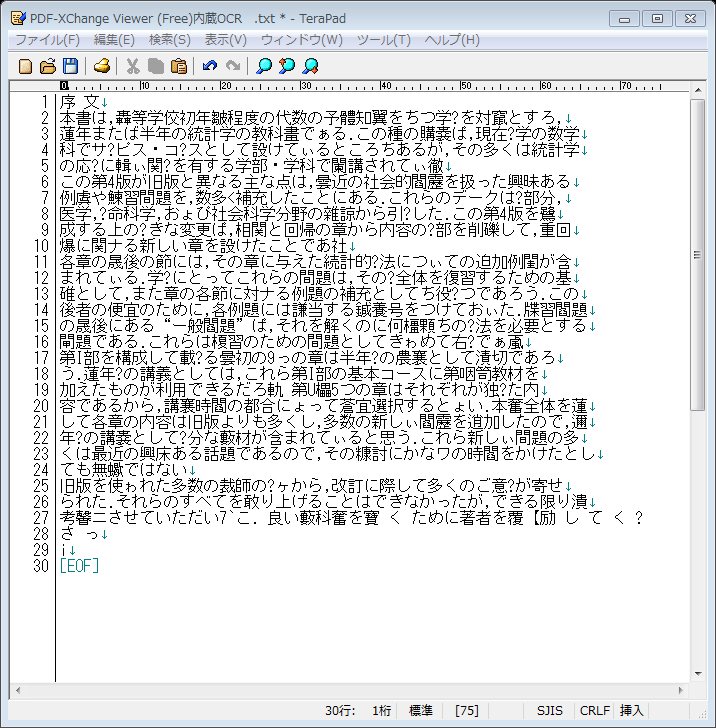
メニューの、ツール(T)&rarr;基本ツール&rarr;選択ツール(L)でカーソルが手袋から矢印に変わったら文章上でドラッグすると選択状態になります。<br />
テキスト選択後コピーして、メモ帳に貼り付けたものがこちら。<br />
<a href="//pdffreesoft.gjpw.net/File/003815AE.png" target="_blank"><img alt="" border="0" src="//pdffreesoft.gjpw.net/Img/1337580899/" /></a><br />
<br />
だいぶがんばっているようですが、すんなりとは読めませんね。<br />
<br />
これが「透明テキスト」の中身なのですが、この認識レベルだと、後で特定の文字列を全文検索などしても引っかかりそうにありません。何しろ元ファイルがこれだけ崩れていては。
<br />
<br />
<h4>
	そして、<strong>読んでココ</strong>（正しくは、<strong>読んde!!ココ</strong>）。</h4>
<br />
このソフトは、昔に購入したEPSONフラットヘッドスキャナにバンドル（付属）していたパーソナル版からアップグレード購入（<a href="http://www.amazon.co.jp/gp/product/B005FOD558/ref=as_li_ss_tl?ie=UTF8&amp;tag=hogasu-22&amp;linkCode=as2&amp;camp=247&amp;creative=7399&amp;creativeASIN=B005FOD558">読んde!!ココ Ver.13 アップグレード版 for ダウンロード [ダウンロード]</a><img alt="" border="0" height="1" src="http://www.assoc-amazon.jp/e/ir?t=hogasu-22&amp;l=as2&amp;o=9&amp;a=B005FOD558" style="border:none !important; margin:0px !important;" width="1" />）したものです。<br />
<br />
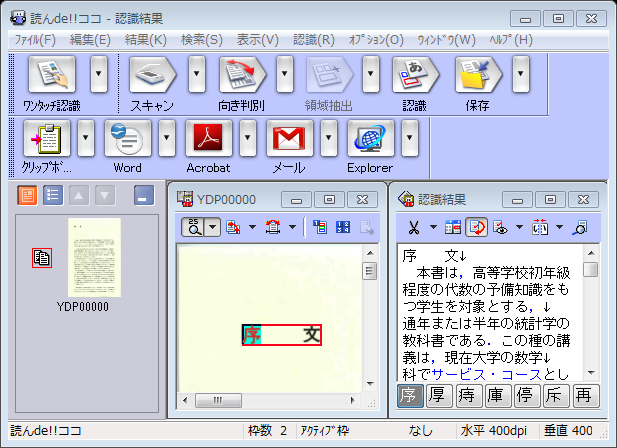
読んでココを立ちあげて、メニューの、ファイル(F)&rarr;PDFファイルから取り込む&rarr;ファイル名指定&rarr;ページ番号指定後、このような画面になるので、<br />
<a href="//pdffreesoft.gjpw.net/File/00070076.png" target="_blank"><img alt="00070076.png" src="//pdffreesoft.gjpw.net/Img/1337582075/" style="border-width: 0px; border-style: solid; vertical-align: text-bottom; width: 300px; height: 217px; " /></a><br />
<br />
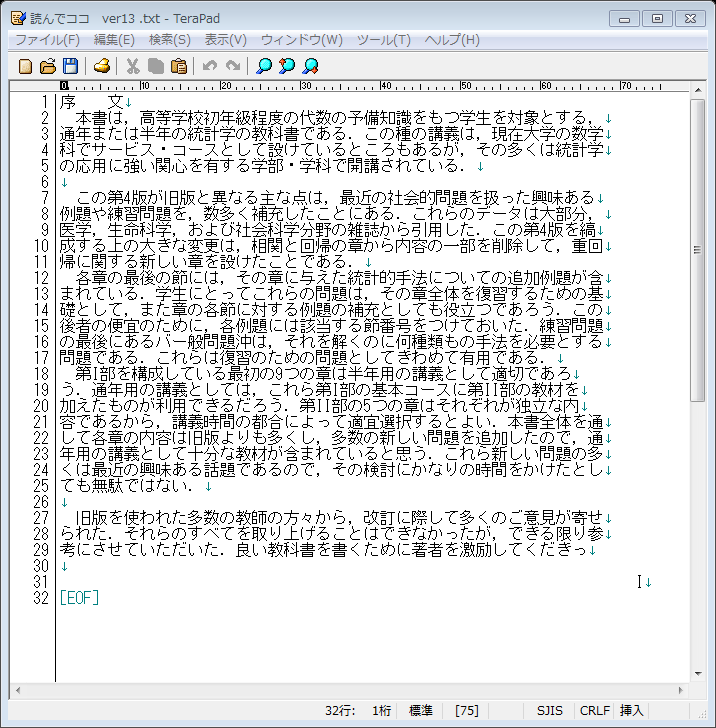
ここでクリップボードに転送を押すと、認識結果のテキスト情報がコピーされるので、これもまた、メモ帳に貼り付けました。<br />
<a href="//pdffreesoft.gjpw.net/File/0001191C.png" target="_blank"><img alt="" border="0" src="//pdffreesoft.gjpw.net/Img/1337582365/" /></a><br />
<br />
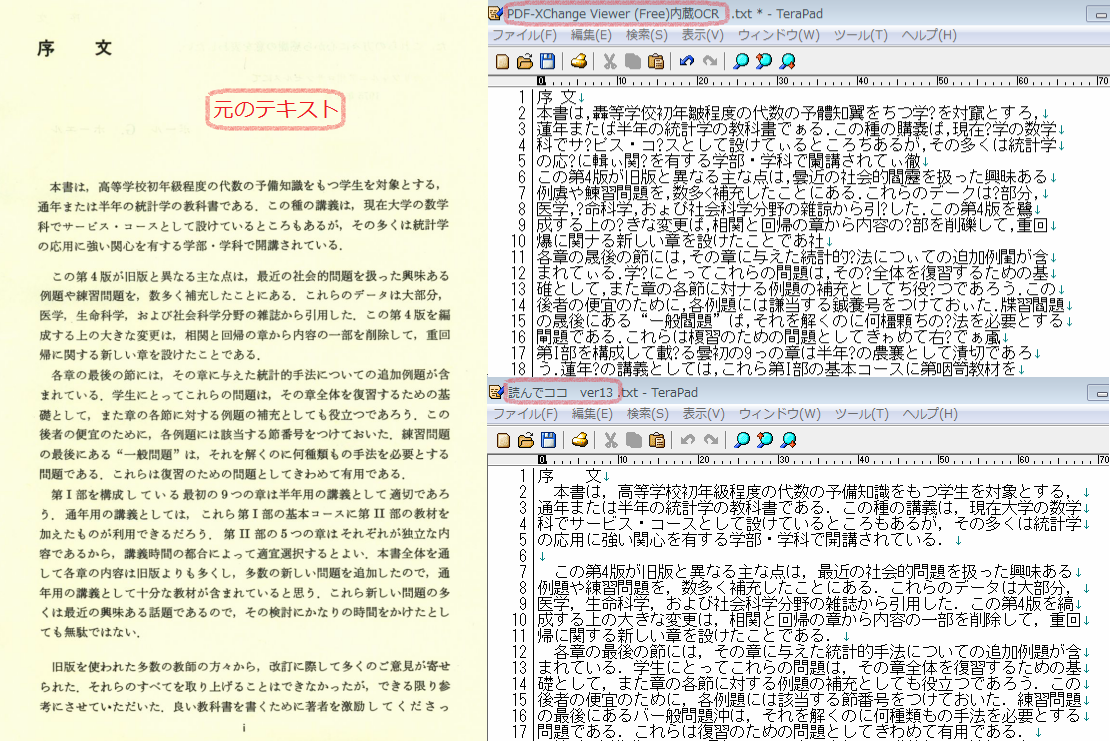
コチラは前と違ってほぼ完全に認識されていてストレスなく読むことができます。<br />
並べて比較してみました。<br />
<a href="//pdffreesoft.gjpw.net/File/d873b4ab.png" target="_blank"><img alt="d873b4ab.png" src="//pdffreesoft.gjpw.net/Img/1337587317/" style="border-width: 0px; border-style: solid; vertical-align: text-bottom; width: 600px; height: 400px; " /></a><br />
<br />
<h4>
	まとめ</h4>
国産有料ソフトでは、ここまで完全に認識されるなら、文章だけの小説本などはPDFファイルのままで閲覧するよりも、少しだけ手間はかかりますが、OCR&rarr;テキストファイル化することによって文字サイズやフォントの変更が出来るようになるので、他のソフトや電子ブックリーダーやスマートフォン等にに送った時に格段に読みやすくなると思います。<br />
<p>
	<b>スポンサード リンク</b></p>
<script type="text/javascript"><!--
google_ad_client = "ca-pub-0147365728061329";
/* 336x280,新フッター　レクタングル10/06/22 */
google_ad_slot = "0983853595";
google_ad_width = 336;
google_ad_height = 280;
//-->
</script><script type="text/javascript"
src="http://pagead2.googlesyndication.com/pagead/show_ads.js">
</script>
<p>
	&nbsp;</p>
<!-- AddThis Button BEGIN -->
<div class="addthis_toolbox addthis_default_style ">
<a class="addthis_button_facebook_like" fb:like:layout="button_count"></a>
<a class="addthis_button_tweet"></a>
<a class="addthis_button_google_plusone" g:plusone:size="medium"></a>
<a class="addthis_counter addthis_pill_style"></a>
</div>
<script type="text/javascript">var addthis_config = {"data_track_addressbar":true};</script>
<script type="text/javascript" src="http://s7.addthis.com/js/250/addthis_widget.js#pubid=ra-4fb4ee5b3bb7b9f0"></script>
<!-- AddThis Button END -->
]]> 
    </content>
    <author>
            <name>sanmousaku</name>
        </author>
  </entry>
  <entry>
    <id>pdffreesoft.gjpw.net://entry/102</id>
    <link rel="alternate" type="text/html" href="http://pdffreesoft.gjpw.net/Entry/102/" />
    <published>2012-04-26T23:06:25+09:00</published> 
    <updated>2012-04-26T23:06:25+09:00</updated> 
    <category term="大型裁断機を買ってみた" label="大型裁断機を買ってみた" />
    <title>大型裁断機を買ってみた (PLATA 大型ペーパー断裁機 PC009)</title>
    <content mode="escaped" type="text/html" xml:lang="utf-8"> 
      <![CDATA[<p>
	<b>スポンサード リンク</b></p>
<script type="text/javascript"><!--
google_ad_client = "pub-0147365728061329";
/* 728x90, 作成済み 10/05/05 */
google_ad_slot = "0678247112";
google_ad_width = 728;
google_ad_height = 90;
//-->
</script><script type="text/javascript"
src="http://pagead2.googlesyndication.com/pagead/show_ads.js">
</script>
<p>
	&nbsp;</p>
<strong>大型裁断機を買ってみました。</strong><br />
【<a href="http://www.amazon.co.jp/gp/product/B003MPRP9Y/ref=as_li_ss_tl?ie=UTF8&amp;tag=hogasu-22&amp;linkCode=as2&amp;camp=247&amp;creative=7399&amp;creativeASIN=B003MPRP9Y">PLATA 大型ペーパー断裁機 PC009</a><img alt="" border="0" height="1" src="http://www.assoc-amazon.jp/e/ir?t=hogasu-22&amp;l=as2&amp;o=9&amp;a=B003MPRP9Y" style="border:none !important; margin:0px !important;" width="1" /> 】<br />
<br />
<div>
	数社で販売されていますが、製造元は同じ中国製と思われます。<br />
	<iframe frameborder="0" marginheight="0" marginwidth="0" scrolling="no" src="http://rcm-jp.amazon.co.jp/e/cm?lt1=_blank&amp;bc1=000000&amp;IS2=1&amp;bg1=FFFFFF&amp;fc1=000000&amp;lc1=0000FF&amp;t=hogasu-22&amp;o=9&amp;p=8&amp;l=as4&amp;m=amazon&amp;f=ifr&amp;ref=ss_til&amp;asins=B003MPRP9Y" style="width:120px;height:240px;"></iframe></div>
<br />
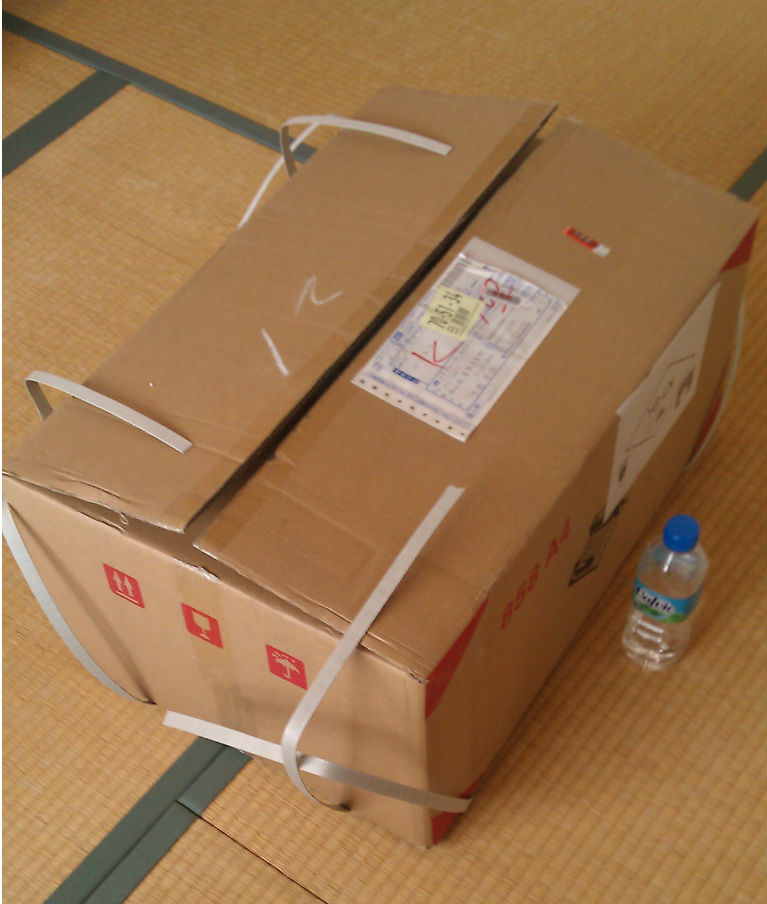
送られてきた箱。かなり大きい。そしてとても重い（17Kg）。<br />
<a href="//pdffreesoft.gjpw.net/File/IMAG0373_copy.jpg" target="_blank"><br />
<img alt="IMAG0373_copy.jpg" src="//pdffreesoft.gjpw.net/Img/1335448296/" style="border-top-width: 0px; border-right-width: 0px; border-bottom-width: 0px; border-left-width: 0px; border-top-style: solid; border-right-style: solid; border-bottom-style: solid; border-left-style: solid; vertical-align: text-top; width: 254px; height: 300px; " /></a><br />
<br />
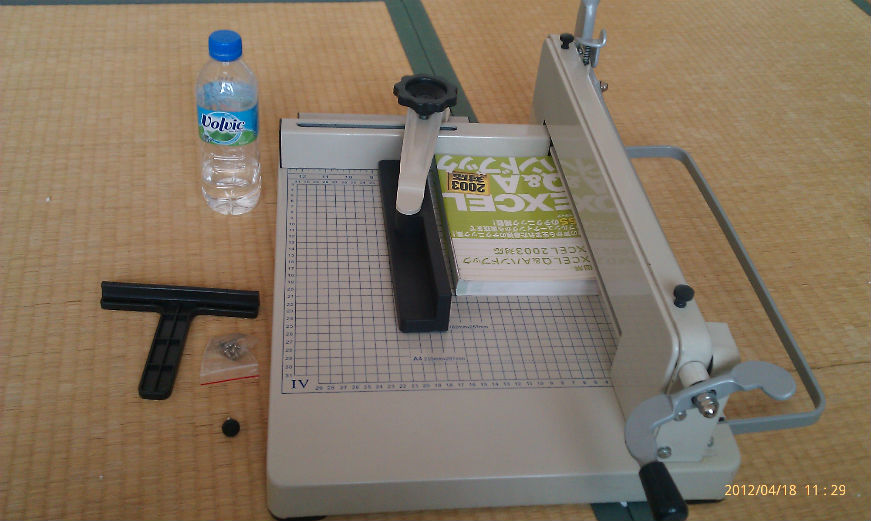
ヴォルビック５００のペットボトルと大きさを比較してみました。<br />
<br />
<br />
<br />
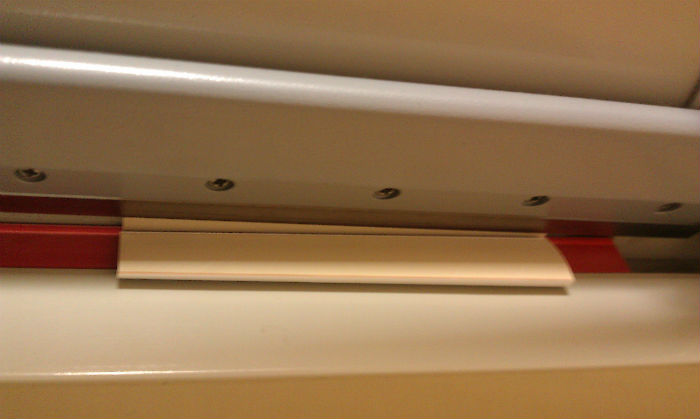
これから裁断する本をあてがってみたところ。T字型の部品は替刃交換時用の治具。<br />
<br />
<a href="//pdffreesoft.gjpw.net/File/IMAG0374_copy.jpg" target="_blank"><img alt="IMAG0374_copy.jpg" src="//pdffreesoft.gjpw.net/Img/1335448297/" style="border-top-width: 0px; border-right-width: 0px; border-bottom-width: 0px; border-left-width: 0px; border-top-style: solid; border-right-style: solid; border-bottom-style: solid; border-left-style: solid; vertical-align: text-top; width: 300px; height: 179px; " /></a><br />
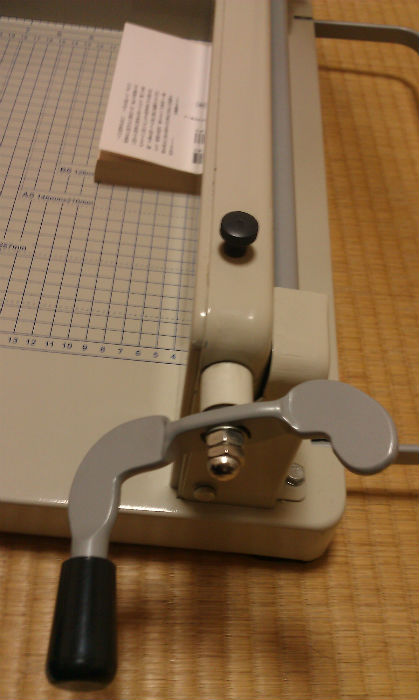
手前のハンドルは、本を上から押さえつけ固定するクランプの上下させるためのもの。<br />
そのすぐ脇に刃が降ります。<br />
<br />
<br />
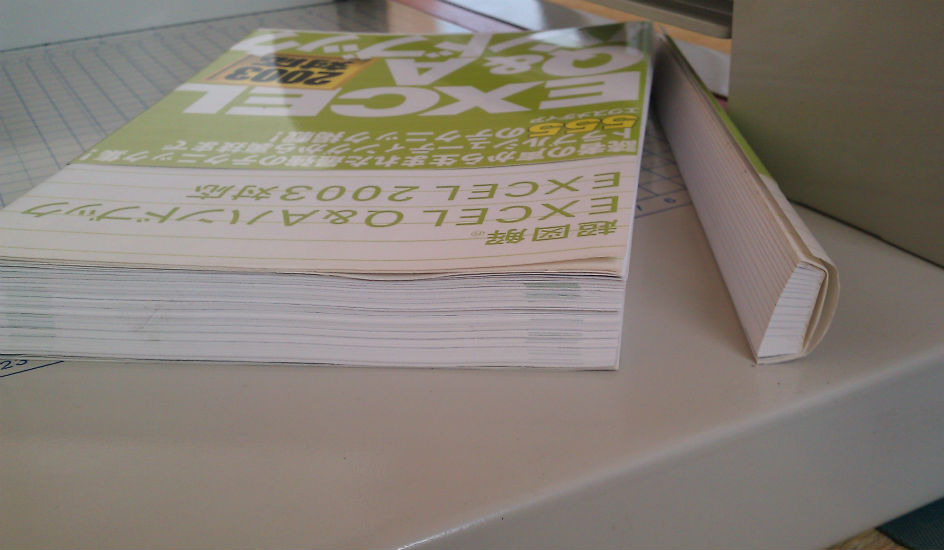
３７mmの厚みまで一度に切れるとあります。<br />
<br />
<a href="//pdffreesoft.gjpw.net/File/setudanngo.jpg" target="_blank"><img alt="setudanngo.jpg" src="//pdffreesoft.gjpw.net/Img/1335448298/" style="border-top-width: 0px; border-right-width: 0px; border-bottom-width: 0px; border-left-width: 0px; border-top-style: solid; border-right-style: solid; border-bottom-style: solid; border-left-style: solid; vertical-align: text-top; width: 300px; height: 174px; " /></a><br />
<br />
このとおり。一度でサクッと切れました。　この本は約2.5センチです。<br />
<br />
もう一冊切ってみます。<br />
<a href="//pdffreesoft.gjpw.net/File/IMAG0015_copy.jpg" target="_blank"><img alt="IMAG0015_copy.jpg" src="//pdffreesoft.gjpw.net/Img/1336485030/" style="border-top-width: 0px; border-right-width: 0px; border-bottom-width: 0px; border-left-width: 0px; border-top-style: solid; border-right-style: solid; border-bottom-style: solid; border-left-style: solid; vertical-align: text-top; width: 179px; height: 300px; " /></a><br />
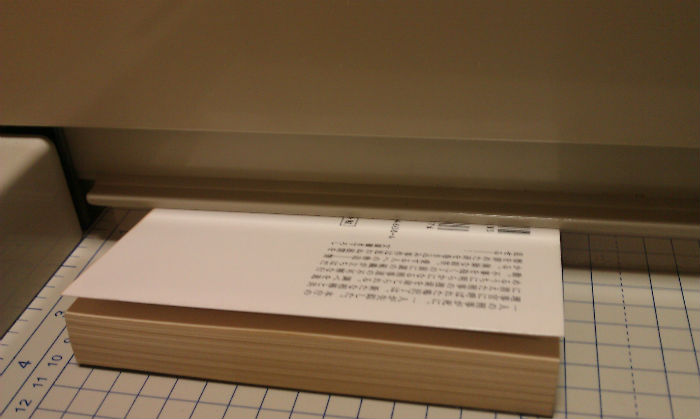
このハンドルを回して本を押さえつけます。固定しておかないと、刃を下ろしていくと本が少しずつズレて、まっすぐに切れないことがあります。<br />
<a href="//pdffreesoft.gjpw.net/File/IMAG0016_copy.jpg" target="_blank"><img alt="IMAG0016_copy.jpg" src="//pdffreesoft.gjpw.net/Img/1336485339/" style="border-top-width: 0px; border-right-width: 0px; border-bottom-width: 0px; border-left-width: 0px; border-top-style: solid; border-right-style: solid; border-bottom-style: solid; border-left-style: solid; vertical-align: text-top; width: 300px; height: 179px; " /></a><br />
このように固定されます。<br />
<br />
そして、レバーを、グイーっと下げると、ギロチン刃が下りて、<br />
<a href="//pdffreesoft.gjpw.net/File/IMAG0013_copy.jpg" target="_blank"><img alt="IMAG0013_copy.jpg" src="//pdffreesoft.gjpw.net/Img/1336485678/" style="border-top-width: 0px; border-right-width: 0px; border-bottom-width: 0px; border-left-width: 0px; border-top-style: solid; border-right-style: solid; border-bottom-style: solid; border-left-style: solid; vertical-align: text-top; width: 300px; height: 179px; " /></a><br />
ザクっと切れました。<br />
<br />
<a href="//pdffreesoft.gjpw.net/File/IMAG0009_copy.jpg" target="_blank"><img alt="IMAG0009_copy.jpg" src="//pdffreesoft.gjpw.net/Img/1336485807/" style="border-top-width: 0px; border-right-width: 0px; border-bottom-width: 0px; border-left-width: 0px; border-top-style: solid; border-right-style: solid; border-bottom-style: solid; border-left-style: solid; vertical-align: text-top; width: 300px; height: 179px; " /></a><br />
刃を上げると背見出しだった部分がポロっと。（ここで指を持っていくと危ないですよ。）<br />
<br />
<br />
その後、２００冊位使用した後は、若干、レバーを押える力を強くする必要がありましたが、切れ味はまだまだ全然いけそうです。（デフォで４～５００冊と謳われています）<br />
<br />
別売りで替刃もあります。<br />
<iframe frameborder="0" marginheight="0" marginwidth="0" scrolling="no" src="http://rcm-jp.amazon.co.jp/e/cm?lt1=_blank&amp;bc1=000000&amp;IS2=1&amp;bg1=FFFFFF&amp;fc1=000000&amp;lc1=0000FF&amp;t=hogasu-22&amp;o=9&amp;p=8&amp;l=as4&amp;m=amazon&amp;f=ifr&amp;ref=ss_til&amp;asins=B001NENA22" style="width:120px;height:240px;"></iframe><br />
<br />
さらに、別売りでこんなのもありました。縦型収納スタンド！。デカすぎ・重すぎなので、いちいち出し入れするのは酷だ、という気持ちはわかります。<br />
<iframe frameborder="0" marginheight="0" marginwidth="0" scrolling="no" src="http://rcm-jp.amazon.co.jp/e/cm?lt1=_blank&amp;bc1=000000&amp;IS2=1&amp;bg1=FFFFFF&amp;fc1=000000&amp;lc1=0000FF&amp;t=hogasu-22&amp;o=9&amp;p=8&amp;l=as4&amp;m=amazon&amp;f=ifr&amp;ref=ss_til&amp;asins=B005C7ZIBM" style="width:120px;height:240px;"></iframe>
<div>
	<br />
	<strong>総評：　</strong><br />
	中国製ですが、細かいことを言わなければ、価格が国産品の約3分の1なので、コストパフォーマンスがよく、刃の耐久性も十分だと思います。<br />
	<br />
	<br />
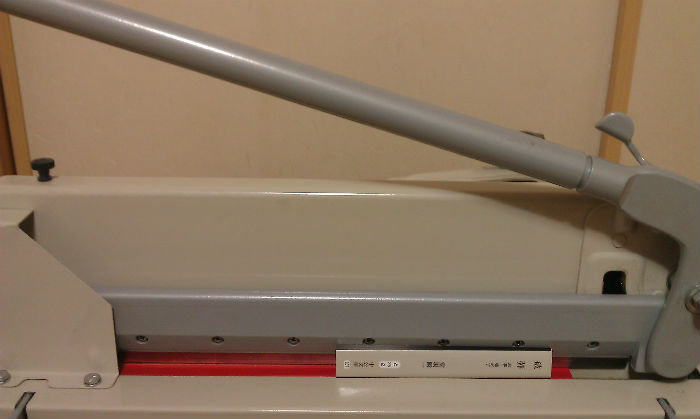
	<strong>短所</strong>は、造りなど全体的に雑な事と、大きく、クソ重いことですが、厚い本を一度で切るならこうなるのは当然かと思われます。<br />
	あと、旧式なギロチンカッターなので刃のあたりに手を近づけるときには細心の注意が必要です。よく切れますから！<br />
	<br />
	<a href="//pdffreesoft.gjpw.net/File/IMAG0010_copy.jpg" target="_blank"><img alt="IMAG0010_copy.jpg" src="//pdffreesoft.gjpw.net/Img/1336484147/" style="border-top-width: 0px; border-right-width: 0px; border-bottom-width: 0px; border-left-width: 0px; border-top-style: solid; border-right-style: solid; border-bottom-style: solid; border-left-style: solid; vertical-align: text-top; width: 300px; height: 179px; " /></a><br />
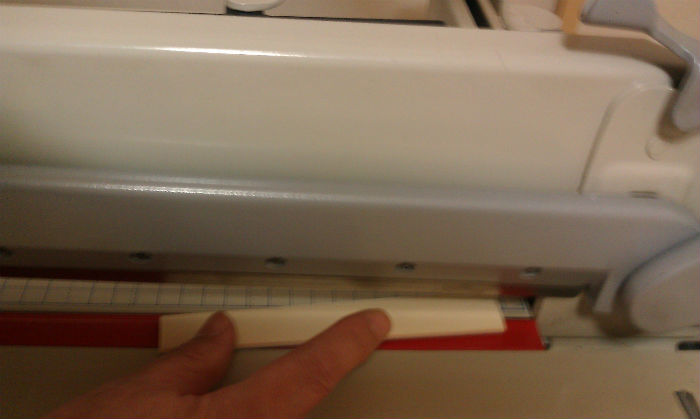
	<font style="color:#ff0000;"><font style="font-size:x-small;">こうやって、キレ残った本の背などをとる時などは要注意！　ひっかき棒などで落としたほうがいいですよ。</font></font><br />
	<br />
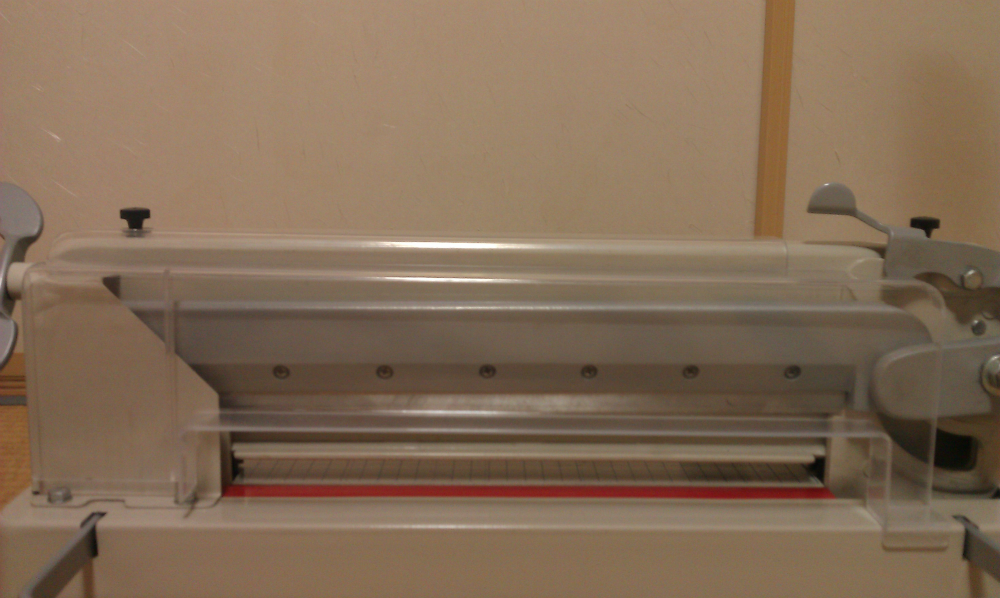
	<strong>安全カバーを装着して使用しましょう。</strong><br />
	<a href="//pdffreesoft.gjpw.net/File/IMAG0112_copy.png" target="_blank"><img alt="IMAG0112_copy.png" src="//pdffreesoft.gjpw.net/Img/1337683035/" style="border-width: 0px; border-style: solid; vertical-align: text-bottom; width: 300px; height: 179px; " /></a><br />
	<br />
	<br />
	<strong>長所</strong>は、国産のより一度に切れる厚さが多い点と、コストパフォーマンス。<br />
	総スチール製なので重量もあり、場所も取りますが、よく切れ、シンプルで使い勝手もよく、とても満足しています。</div>
<br />
<a href="http://www.amazon.co.jp/gp/product/B003MPRP9Y/ref=as_li_ss_il?ie=UTF8&amp;tag=hogasu-22&amp;linkCode=as2&amp;camp=247&amp;creative=7399&amp;creativeASIN=B003MPRP9Y"><img border="0" src="http://ws.assoc-amazon.jp/widgets/q?_encoding=UTF8&amp;Format=_SL160_&amp;ASIN=B003MPRP9Y&amp;MarketPlace=JP&amp;ID=AsinImage&amp;WS=1&amp;tag=hogasu-22&amp;ServiceVersion=20070822" /></a><img alt="" border="0" height="1" src="http://www.assoc-amazon.jp/e/ir?t=hogasu-22&amp;l=as2&amp;o=9&amp;a=B003MPRP9Y" style="border:none !important; margin:0px !important;" width="1" />
<p>
	&nbsp;</p>
<a href="http://www.amazon.co.jp/gp/product/B003MPRP9Y/ref=as_li_ss_tl?ie=UTF8&amp;tag=hogasu-22&amp;linkCode=as2&amp;camp=247&amp;creative=7399&amp;creativeASIN=B003MPRP9Y">PLATA 大型ペーパー断裁機 PC009</a><img alt="" border="0" height="1" src="http://www.assoc-amazon.jp/e/ir?t=hogasu-22&amp;l=as2&amp;o=9&amp;a=B003MPRP9Y" style="border:none !important; margin:0px !important;" width="1" /><br />
<br />
<p>
	<b>スポンサード リンク</b></p>
<script type="text/javascript"><!--
google_ad_client = "ca-pub-0147365728061329";
/* 336x280,新フッター　レクタングル10/06/22 */
google_ad_slot = "0983853595";
google_ad_width = 336;
google_ad_height = 280;
//-->
</script><script type="text/javascript"
src="http://pagead2.googlesyndication.com/pagead/show_ads.js">
</script>
<p>
	&nbsp;</p>
<!-- AddThis Button BEGIN -->
<div class="addthis_toolbox addthis_default_style ">
<a class="addthis_button_facebook_like" fb:like:layout="button_count"></a>
<a class="addthis_button_tweet"></a>
<a class="addthis_button_google_plusone" g:plusone:size="medium"></a>
<a class="addthis_counter addthis_pill_style"></a>
</div>
<script type="text/javascript">var addthis_config = {"data_track_addressbar":true};</script>
<script type="text/javascript" src="http://s7.addthis.com/js/250/addthis_widget.js#pubid=ra-4fb4ee5b3bb7b9f0"></script>
<!-- AddThis Button END -->
]]> 
    </content>
    <author>
            <name>sanmousaku</name>
        </author>
  </entry>
</feed>